# Revtelic Knowledge Base & Product Reference
> Revtelic is the B2B Deal Governance platform for revenue teams that turns customer conversations into closed revenue by automating Mutual Action Plans, detecting deal risks early, extracting pristine MEDDPICC data, and calculating objective Deal Health scores.
---
## [Doc] Buyer Engagement Analytics: Real-Time Telemetry & Reciprocity Tracking
URL: https://revtelic.com/docs/deal-boards/buyer-engagement-analytics
# Buyer Engagement Analytics: Real-Time Telemetry & Reciprocity Tracking
Most sales teams measure pipeline progress using **seller activity metrics**: how many emails were sent, how many calls were logged, and how many demos were completed.
This creates an dangerous illusion of progress. A rep can log 40 outreach activities on an opportunity that has been dead for three weeks.
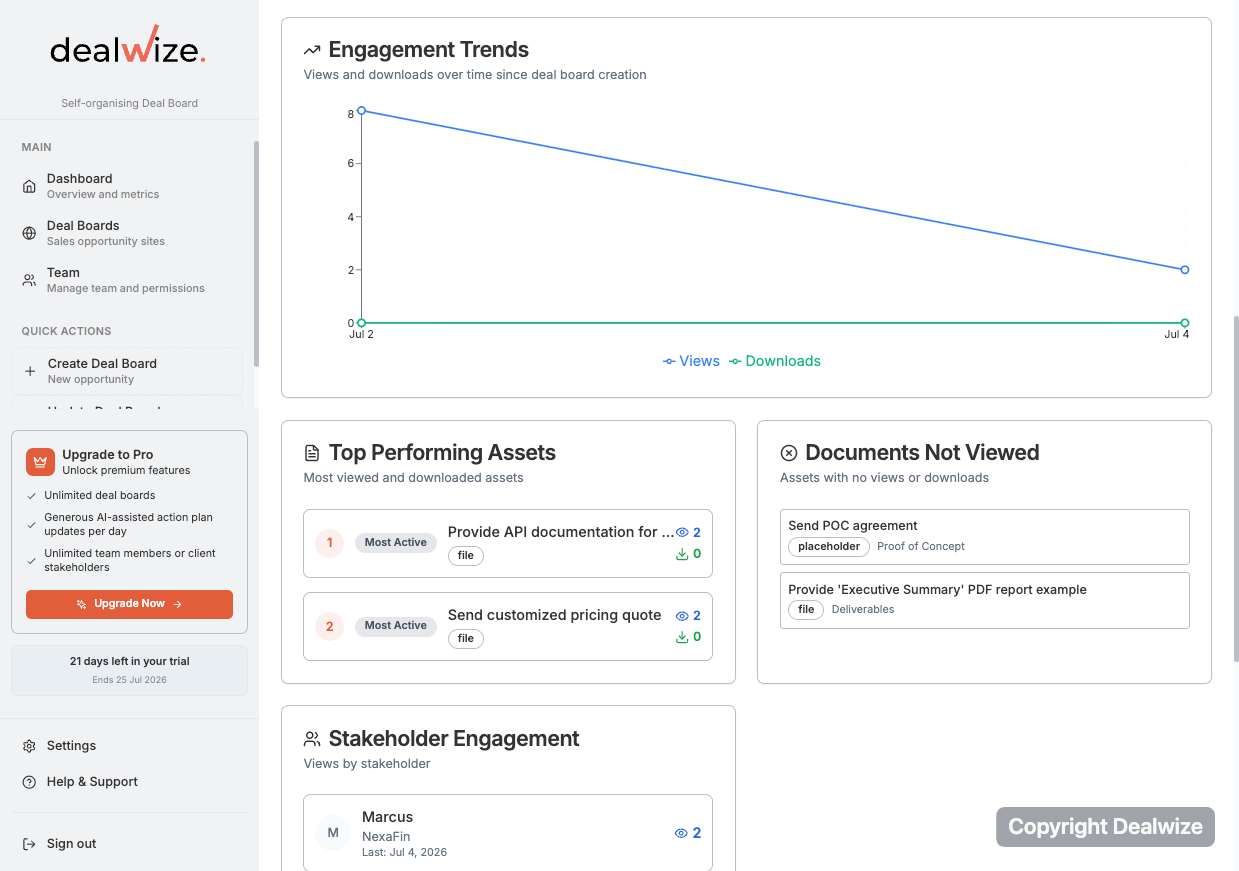
Revtelic replaces seller activity tracking with **empirical buyer engagement analytics**. By embedding lightweight, real-time telemetry into every shared Deal Board, Revtelic measures whether the buying committee is genuinely leaning in—tracking document reads, tab transitions, task sign-offs, and multi-stakeholder visits to eliminate closing surprises.
---
## 1. The Telemetry Architecture
Whenever a prospect champion, executive sponsor, or technical evaluator interacts with a shared Deal Board, Revtelic captures structured behavioral events through our client analytics service (`analyticsService.ts`):
```
┌─────────────────────────────────────────────────────────────┐
│ Buyer Dealboard Session │
│ Tokenized /:orgSlug/:dealboardSlug (Stakeholder View) │
└──────────────────────────────┬──────────────────────────────┘
│
Real-Time Behavioral Telemetry
│
▼
┌─────────────────────────────────────────────────────────────┐
│ Client Analytics Service │
│ sendBeacon / POST /api/analytics/events │
├─────────────────────────────────────────────────────────────┤
│ • microsite_viewed: Unique session timestamps & referrers │
│ • microsite_action_plan_tab_viewed: Plan review frequency │
│ • microsite_content_tab_viewed: Collateral room browsing │
│ • asset_viewed: Document read duration & revisit counts │
│ • asset_downloaded: Local saving of security / legal files │
└──────────────────────────────┬──────────────────────────────┘
│
▼
┌─────────────────────────────────────────────────────────────┐
│ Revtelic Intelligence Engine │
│ Risk Sentinel • Deal Health Scoring │
└─────────────────────────────────────────────────────────────┘
```
### Measured Interaction Events
1. **`microsite_viewed`**: Logs when a stakeholder opens the Deal Board. Captures viewer timestamp, session ID, browser user agent, and referral channel.
2. **`microsite_action_plan_tab_viewed`**: Tracks when evaluators navigate to the **Action Plan** tab to inspect milestone dates, deadlines, and task ownership.
3. **`microsite_content_tab_viewed`**: Captures visits to the **Content** room to evaluate technical architecture, pricing summaries, and product walkthroughs.
4. **`asset_viewed`**: Detects when a specific document (e.g. *SOC 2 Report*, *Commercial Proposal*) is opened in the in-browser preview modal.
5. **`asset_downloaded`**: Records when an authorized stakeholder downloads a contract, spreadsheet, or PDF to their local computer for internal circulation.
---
## 2. Three Predictive Buyer Signals
Revtelic synthesizes raw event streams into three actionable deal health indicators:
### 1. The Reciprocity Index
A healthy deal is a shared project. Revtelic measures the ratio between **seller commitments fulfilled** and **buyer commitments fulfilled**:
* **Healthy Reciprocity (Score > 0.8)**: The seller completes vendor deliverables while buyer stakeholders actively check off internal milestones (e.g., *Schedule Infosec Introduction*, *Confirm procurement billing address*).
* **Asymmetric Effort (Score < 0.3)**: The seller has completed 7 tasks while the buyer has completed 0 tasks and made zero visits in the last 10 days. The **Risk Sentinel** automatically flags this imbalance as an immediate deal stalling risk.
### 2. Multi-Stakeholder Footprint
Single-threaded deals fail at four times the rate of multithreaded evaluations. Revtelic monitors the spread of engagement across the organization:
* Telemetry detects when the initial champion forwards the Deal Board to technical evaluators, Infosec directors, or finance leaders.
* If multiple unique stakeholders visit the board within 48 hours of proposal delivery, the **Value Architect** increases deal velocity scoring.
### 3. Content Velocity & High-Intent Signals
Certain document interactions carry disproportionate commercial intent:
* A prospect reviewing your **Security & Compliance** category for 15 minutes is strong empirical proof of procurement readiness.
* If legal downloads the **Master Services Agreement (MSA)**, Revtelic recognizes high-intent momentum and prompts the rep to schedule the final commercial review.
---
## 3. Detecting the "Silent Stall" (Ghosting Detection)
Deals rarely die from loud, explicit rejections. They die from creeping silence.
```
⚠️ Early Warning: Silent Stall Detected
Severity: HIGH (Deal Health drop: -20 pts)
Condition: Zero buyer dealboard visits in 14 business days.
Last Event: "Commercial Proposal 3-Year.pdf" viewed on 18-Aug-2026.
Diagnosis: Prospect champion reviewed pricing, but no subsequent
stakeholder visits or milestone sign-offs were recorded.
Prescription: "Do not send generic 'just checking in' emails. Share the
updated implementation timeline addressing the Q4 go-live date."
```
By monitoring continuous buyer telemetry, Revtelic alerts sales reps to silent stalls **weeks before quarter-end**, providing reps with the exact diagnostic context needed to revive the conversation.
---
## 4. Privacy & Consent Compliance
Enterprise sales telemetry must respect corporate data privacy:
* Revtelic adheres to global privacy frameworks (GDPR / CCPA).
* Telemetry collection can include client consent management (`AnalyticsConsentBanner.tsx`).
* Confidential prospect browsing data is securely compartmentalized within your organization's encrypted database and is never shared with third parties.
---
## Related Guides & Deep Dives
* [Interactive Q&A Module: Contextual Buyer Objections & Resolution](/docs/deal-boards/interactive-qa-module)
* [Managing and Resolving Deal Risks: The Deal Risk Matrix](/docs/deals/risk-detection-and-matrix)
* [Understanding Deal Health & Scoring Mechanics](/docs/deals/understanding-deal-health)
* [Content & Document Management: Uploads & Milestone Linking](/docs/deal-boards/content-and-document-management)
---
## [Doc] Content & Document Management: Uploads, Categories & Milestone Linking
URL: https://revtelic.com/docs/deal-boards/content-and-document-management
# Content & Document Management
Sending attachments over email causes version confusion, exposes outdated pricing, and clutters your champion's inbox.
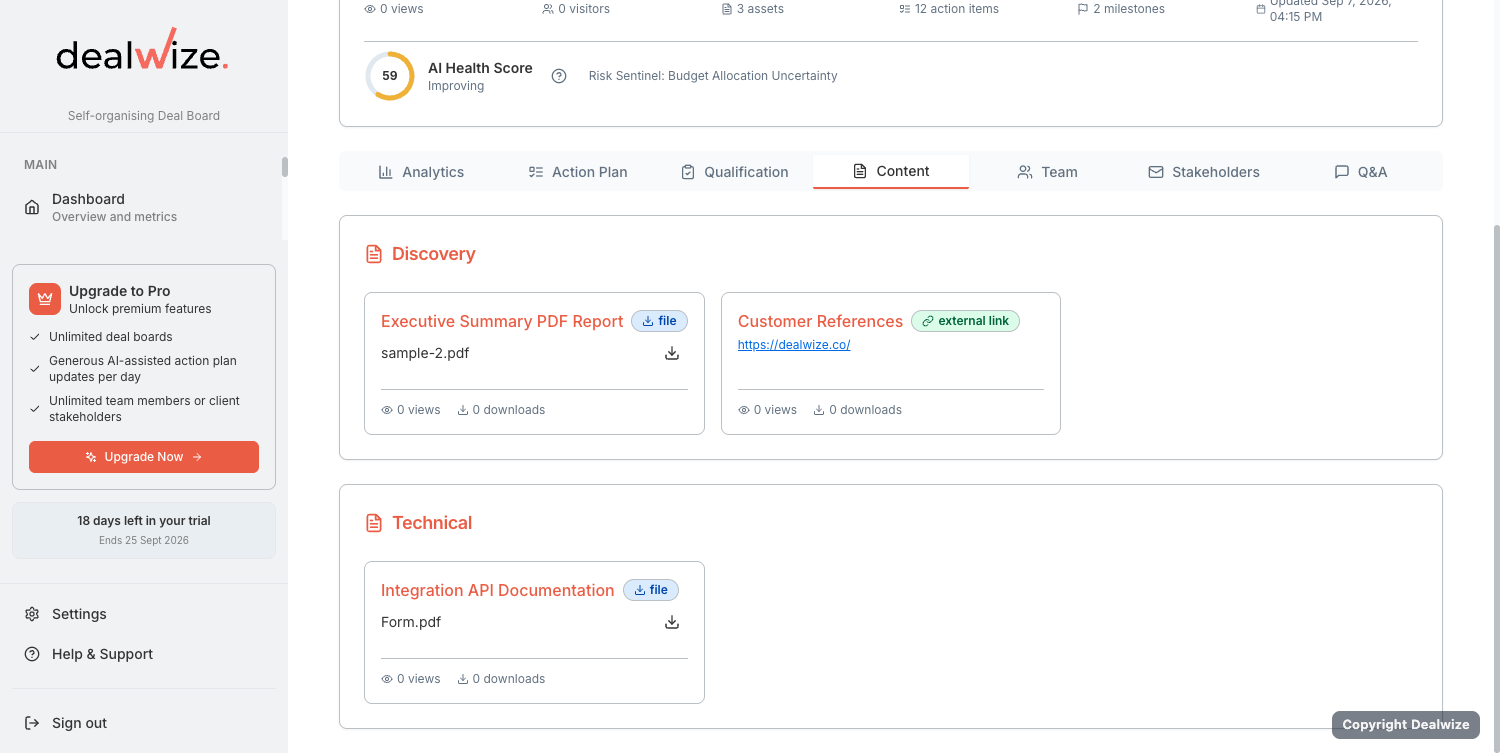
Revtelic Deal Boards include a centralized **Content Room** alongside your Mutual Action Plan. Sellers can curate sales presentations, technical whitepapers, security certifications, and commercial proposals in one branded digital space—complete with in-browser previews and direct linkage to evaluation milestones.
---
## 1. Supported Document & Asset Types
Revtelic supports a wide range of collateral formats to accommodate every stage of enterprise evaluation:
| Asset Type | Supported Formats | Recommended Use Cases |
| :--- | :--- | :--- |
| **PDF Documents** | `.pdf` | Commercial proposals, SOC 2 audit reports, Master Services Agreements (MSAs), security questionnaires. |
| **Presentations** | `.pdf`, `.pptx`, slide decks | Executive pitch decks, custom solution architectures, board-level summaries. |
| **Spreadsheets** | `.xlsx`, `.csv` | Business case calculations, ROI models, data migration templates. |
| **Media & Video** | Embedded video (`.mp4`, Loom, YouTube) | Tailored product walkthroughs, executive greetings, feature demonstration recordings. |
| **External Links** | Secure web URLs | API documentation, interactive sandboxes, status pages, knowledge base articles. |
| **Rich Text Notes** | Formatted text & HTML | Meeting executive summaries, custom implementation timelines, next step briefings. |
---
## 2. Organizing Assets into Custom Categories
To keep complex evaluations structured and easy for buyers to navigate, assets are grouped into logical **Categories**:
1. Open your deal in the Deal Board editor (`/deal-boards/[id]/edit`).
2. Navigate to the **Content** section.
3. Click **Add Category** to create a custom section (e.g. *Executive Overview*, *Technical & Security Validation*, *Commercial & Legal*).
4. Drag and drop uploaded assets into their respective categories, or reorder categories to reflect the logical flow of the evaluation.
```
┌─────────────────────────────────────────────────────────────┐
│ Acme Corp Deal Board Content │
├─────────────────────────────────────────────────────────────┤
│ ▼ 1. Executive Overview │
│ ├── Hybrid Cloud Architecture Proposal.pdf │
│ └── Executive Walkthrough & Business Impact (Video) │
│ │
│ ▼ 2. Security & Compliance │
│ ├── SOC 2 Type II Compliance Report.pdf │
│ └── Cloud Penetration Testing Summary 2026.pdf │
│ │
│ ▼ 3. Commercials & Contracting │
│ ├── Master Services Agreement Draft v1.2.pdf │
│ └── 3-Year ROI & TCO Financial Model.xlsx │
└─────────────────────────────────────────────────────────────┘
```
---
## 3. In-Browser Document Previews
Enterprise buyers are often reluctant to download email attachments due to corporate IT security policies.
Revtelic provides built-in, secure **in-browser previews**:
* **PDF Previews**: Evaluators can read multi-page proposals and security reports directly inside the dealboard viewer without downloading them to their local machine.
* **Integrated Media Player**: Video walkthroughs stream directly inside the browser (`MediaPlayer.tsx`), providing a polished, high-touch executive experience.
* **Controlled Download Permissions**: If a stakeholder has **Read-only** access, they can preview files in-browser but cannot download raw files to disk, protecting sensitive commercial IP.
---
## 4. Linking Documents to MAP Milestones
The most powerful feature of Revtelic's content architecture is **Milestone Linking**.
Instead of asking buyers to search through a document folder for the relevant contract or security spec, you can tie specific documents directly to their corresponding Mutual Action Plan items:
```
Action Item: "Infosec Team SOC 2 Review & Vendor Clearance"
Owner: Elena Rostova (Infosec Lead)
Deadline: 18-Sep-2026
Linked File: [📄 SOC 2 Type II Report 2026.pdf] <-- Click to Preview
```
### How to Link an Asset to an Action Item:
1. In the Deal Board editor, scroll to your **Mutual Action Plan**.
2. Click on the action item or milestone (e.g. *Complete InfoSec audit*).
3. In the item details modal, select the **Linked Asset** dropdown.
4. Choose the uploaded document from your category list (e.g. *SOC 2 Type II Compliance Report*).
5. Save the item.
When the customer opens their Stakeholder View, a direct document preview button appears right beside that milestone. With one click, their InfoSec lead opens the report, reviews the controls, and checks off the task.
---
## 5. Engagement Telemetry on Content
Every document view and download in the Deal Board is tracked:
* **`asset_viewed`**: Logs when a buyer opens a document preview in-browser, capturing timestamp and viewer identity.
* **`asset_downloaded`**: Logs when an authorized stakeholder downloads a file to their local machine.
This intelligence eliminates sales guesswork. You know exactly when legal opens your redline or when the CFO downloads your pricing model before you ever jump on a call.
---
## Related Guides & Deep Dives
* [Managing Stakeholder & Team Access: External Clients vs. Internal Workspaces](/docs/deal-boards/stakeholder-and-team-access)
* [Interactive Q&A & Buyer Engagement Telemetry](/docs/deal-boards/interactive-qa-and-buyer-engagement)
* [Creating & Sharing Collaborative Mutual Action Plans](/docs/mutual-action-plans/creating-and-sharing-maps)
---
## [Doc] Interactive Q&A Module: Contextual Buyer Objections & Resolution
URL: https://revtelic.com/docs/deal-boards/interactive-qa-module
# Interactive Q&A Module: Contextual Objection Resolution
In complex enterprise evaluations, dozens of detailed questions emerge across technical architecture, security compliance, pricing structure, and implementation timelines.
When these questions are scattered across multi-recipient email chains, answers get lost, different stakeholders ask the same question repeatedly, and evaluation momentum stalls.
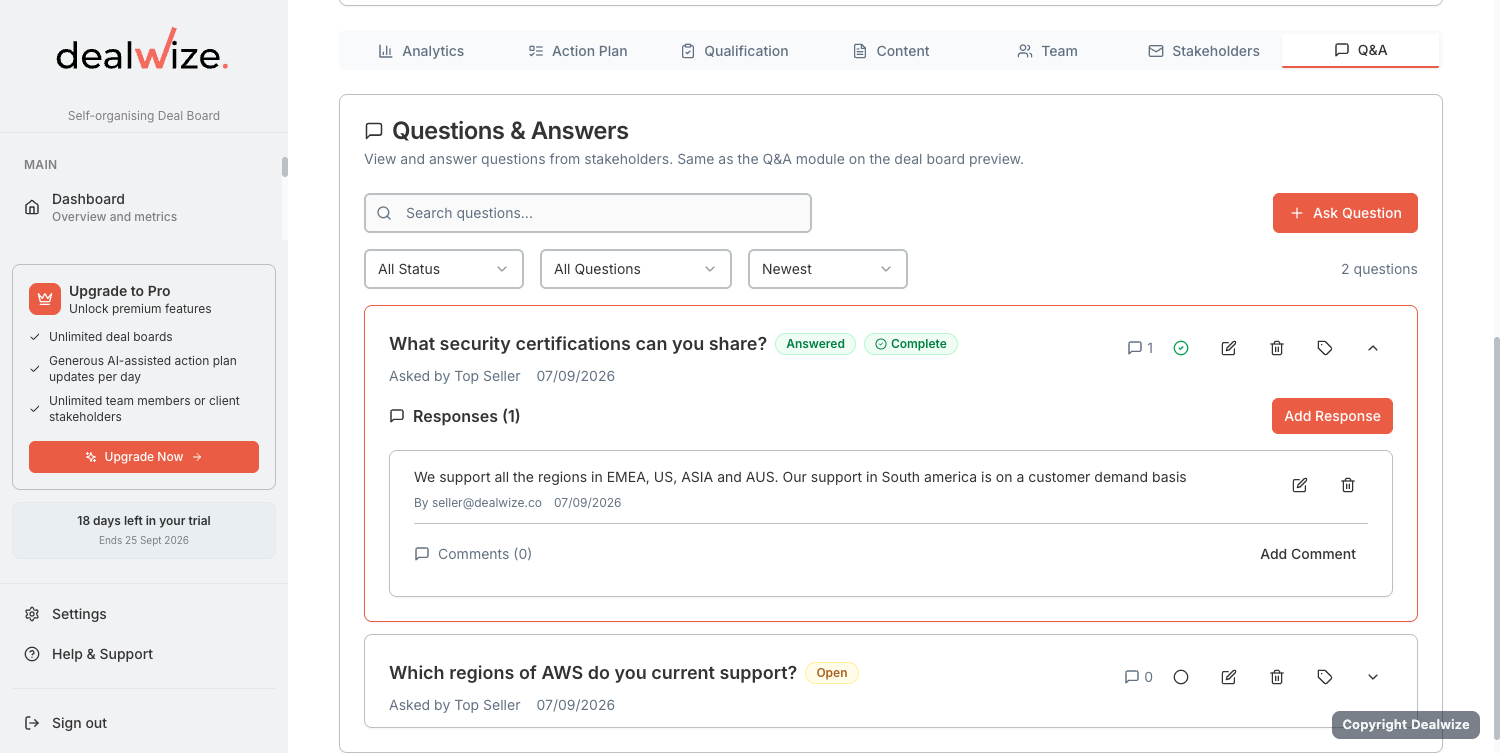
Revtelic provides a dedicated **Interactive Q&A Module** embedded directly in your shared Deal Boards (`micrositeQAService.ts`), allowing buyers and sellers to resolve inquiries collaboratively in context.
---
## 1. Two Question Scopes: Board-Level vs. Asset-Level
Unlike generic chat widgets, Revtelic anchors discussions directly to the relevant deal collateral:
```
┌─────────────────────────────────────────────────────────────┐
│ Deal Board Q&A Structure │
├─────────────────────────────────────────────────────────────┤
│ 1. Dealboard-Level Questions │
│ • "What is our agreed pilot start date and milestones?" │
│ • "Can billing be split across two fiscal entities?" │
│ │
│ 2. Asset-Level Contextual Questions │
│ • Attached to: "Master Services Agreement Draft.pdf" │
│ └── "Can we modify clause §8.2 on IP indemnification?" │
│ • Attached to: "SOC 2 Type II Audit Report.pdf" │
│ └── "Where are EU backup snapshots hosted?" │
└─────────────────────────────────────────────────────────────┘
```
### 1. Dealboard-Level Inquiries
* Broad questions covering commercial terms, target rollout dates, implementation support, or executive objectives.
* Accessible anytime via the **Q&A Floating Button** or the dedicated Q&A panel on the board.
### 2. Asset-Level Contextual Inquiries
* Questions anchored to a specific uploaded document (e.g. Master Services Agreement, Infosec Whitepaper, or Architecture Spec).
* Documents with active inquiries display visual badge counts (e.g., `💬 2 questions on this file`), allowing evaluators to see existing answers before asking duplicate questions.
---
## 2. The Question Resolution Lifecycle
Revtelic manages questions through a clear operational workflow:
* **Status Tracking**:
* **`open`**: Newly submitted question awaiting vendor or champion response.
* **`answered`**: Official response provided by the sales engineer or account executive.
* **`closed`**: Fully resolved inquiry signed off by the asking stakeholder.
* **Urgency Flagging (`isUrgent`)**: Buying committee members can flag time-sensitive blockers as **Urgent**, alerting the account team for immediate triage.
* **Threaded Responses & Collaborator Comments**: Sales engineers and reps can draft internal collaborator notes before publishing official responses visible to the buyer.
* **Departmental Tagging**: Route inquiries using tags (e.g. *Security*, *Legal*, *API/Integration*, *Pricing*) so the right specialist can answer quickly.
---
## 3. Best Practices for Dealboard Q&A
1. **Answer in the Board, Not in Email**: When a buyer emails a question, post the answer in the Deal Board Q&A and link to the document. This ensures the entire buying committee benefits from the clarification.
2. **Pre-populate Frequently Asked Questions**: When sharing a technical proposal or security report, proactively add common Infosec answers to save days of back-and-forth review.
3. **Audit Open Inquiries Before Sync Calls**: Use open Q&A items as the running agenda for weekly evaluation calls to ensure blockers are dismantled systematically.
---
## Related Guides & Deep Dives
* [Buyer Engagement Analytics: Real-Time Telemetry & Reciprocity Tracking](/docs/deal-boards/buyer-engagement-analytics)
* [Content & Document Management: Uploads & Milestone Linking](/docs/deal-boards/content-and-document-management)
* [External Stakeholder Access: Read-only vs. Collaborate Permissions](/docs/deal-boards/stakeholder-access-and-permissions)
---
## [Doc] External Stakeholder Access: Read-only vs. Collaborate Permissions
URL: https://revtelic.com/docs/deal-boards/stakeholder-access-and-permissions
# External Stakeholder Access & Permissions
When sharing a Deal Board with an enterprise customer, you are inviting multiple stakeholders across technical, legal, procurement, and executive functions.
Different committee members need different levels of interaction. Your champion needs to tick off completed action items and download architecture specs, while an executive sponsor may only want to view high-level timeline progress.
Revtelic provides granular, role-based access management built specifically for external buyer stakeholders (`stakeholderAccess.ts`).
---
## 1. Two External Access Tiers
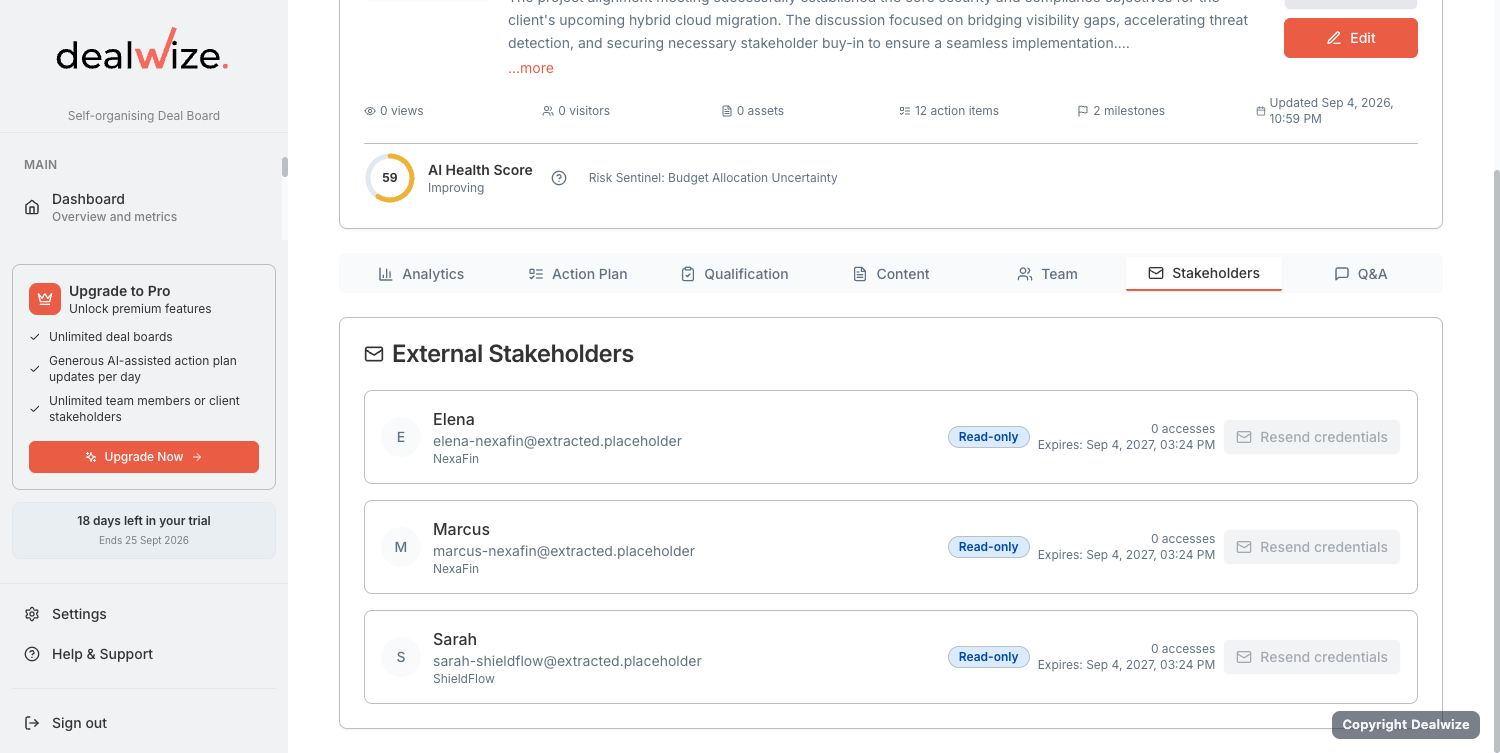
Revtelic simplifies client permissions into two clear operational tiers:
| Access Tier | UI Label | Allowed Capabilities | Restricted Capabilities | Ideal Stakeholders |
| :--- | :--- | :--- | :--- | :--- |
| **`view`** | **Read-only** | • View the living Mutual Action Plan
• Preview shared documents in-browser
• View answered Q&A items | ❌ Cannot download raw files
❌ Cannot check off action items
❌ Cannot post comments or questions | Executive Sponsors, secondary observers, budget approvers who need passive visibility. |
| **`contribute`** | **Collaborate** | • View & download all shared documents
• Check off assigned action items
• Complete subtask checklists
• Ask and reply in the Q&A module | ❌ Cannot delete phases
❌ Cannot view internal sales notes or health scores | Sales Champions, Technical Evaluators, InfoSec leads, Procurement managers. |
---
## 2. Zero-Friction Passwordless Access
Enterprise buyers should never be forced to create an account, remember a password, or download software just to review your sales proposal or project roadmap:
* **Personalized Magic Links**: Stakeholders access their shared Deal Board through secure, tokenized URLs.
* **Instant Session Authentication**: When a stakeholder clicks their invitation link, a secure session (`stakeholderAuth.ts`) is established automatically in their browser.
* **Device Independence**: Evaluators can review the board on desktop, tablet, or mobile with zero friction.
---
## 3. Resolving AI-Extracted Placeholder Emails
When Revtelic's **Milestone Miner** extracts stakeholder commitments from discovery call transcripts (e.g. *"David Chen agreed to review the REST API specs"*), the system automatically creates a stakeholder record with an `@extracted.placeholder` address.
This allows the AI to immediately attribute tasks to David Chen on your internal roadmap even before you have his real corporate email.
### Converting Placeholders to Verified Invites:
1. Open the **Stakeholders** panel in the Deal Board editor.
2. Any auto-extracted contact without a confirmed email is flagged with a warning: **Email Required**.
3. Click the stakeholder row and enter David's real corporate email (e.g. `david.chen@acme.corp`).
4. Choose the appropriate access tier (**Read-only** or **Collaborate**).
5. Click **Send Invitation**. The placeholder is updated, and an invite email with David's personalized magic link is delivered.
---
## 4. Strict Security & Data Isolation
Client-facing Deal Boards are completely isolated from internal sales intelligence:
* **Strictly Excluded**: Deal Health score (0–100), The Brutal Truth, risk radar, internal rep next steps, AE forecast percentages, and private coaching notes are completely stripped out before rendering the board.
* **Visible**: Only mutual objectives, customer executive summaries (`client_executive_summary`), agreed milestones, and published collateral are rendered.
---
## Related Guides & Deep Dives
* [Managing Team Access: Roles, Permissions & Workspace Seats](/docs/getting-started/team-access-and-roles)
* [Content & Document Management: Uploads & Milestone Linking](/docs/deal-boards/content-and-document-management)
* [Interactive Q&A Module: Contextual Buyer Objections & Resolution](/docs/deal-boards/interactive-qa-module)
* [Buyer Engagement Analytics: Real-Time Telemetry & Reciprocity Tracking](/docs/deal-boards/buyer-engagement-analytics)
---
## [Doc] Automating Deal Qualification: MEDDIC, BANT & CHAMP Frameworks
URL: https://revtelic.com/docs/deals/qualification-meddic-bant-champ
# Automating Deal Qualification: MEDDIC, BANT & CHAMP
Most sales teams treat deal qualification as an administrative chore. Reps fill out dozens of CRM fields right before weekly pipeline reviews, typing in optimistic guesses just to satisfy sales managers.
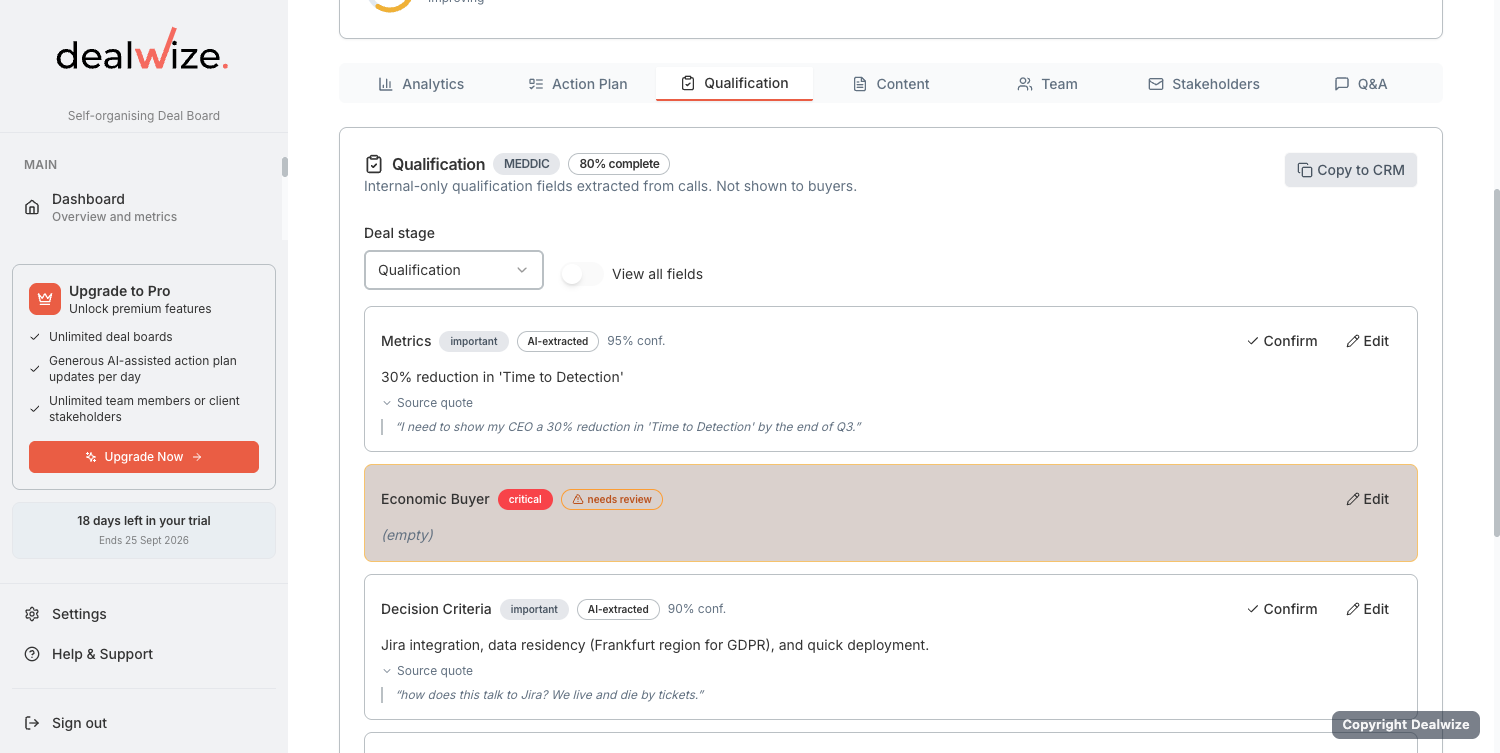
Revtelic transforms qualification from a static checkbox into a **continuous, evidence-driven discipline**. Powered by our multi-agent pipeline, Revtelic extracts concrete qualification signals directly from customer conversations, unifies them into a single canonical record, and scores deal completeness across three industry-standard frameworks: **BANT**, **CHAMP**, and **MEDDIC**.
---
## 1. The Canonical Qualification Model
Rather than forcing reps to fill out conflicting qualification templates for different sales leaders, Revtelic maintains a **single canonical key set** (`CANONICAL_KEYS`):
```
┌─────────────────────────────────────────┐
│ Canonical Qualification Record │
└────────────────────┬────────────────────┘
│
┌─────────────────────────────────────┼─────────────────────────────────────┐
▼ ▼ ▼
┌───────────────────────────┐ ┌───────────────────────────┐ ┌───────────────────────────┐
│ BANT Screening View │ │ CHAMP Discovery View │ │ MEDDIC Enterprise View │
│ (Early Stage) │ │ (Mid Stage) │ │ (Late Stage) │
├───────────────────────────┤ ├───────────────────────────┤ ├───────────────────────────┤
│ • Budget Status (Critical)│ │ • Challenges / Pain (Crit)│ │ • Metrics (Important) │
│ • Authority Contact (Crit)│ │ • Authority Contact (Imp) │ │ • Economic Buyer (Crit) │
│ • Pain / Need (Critical) │ │ • Money / Budget (Imp) │ │ • Decision Criteria (Imp) │
│ • Timeline (Important) │ │ • Prioritization (Imp) │ │ • Decision Process (Imp) │
│ │ │ │ │ • Identify Pain (Crit) │
│ │ │ │ │ • Champion (Critical) │
└───────────────────────────┘ └───────────────────────────┘ └───────────────────────────┘
```
When you analyze a call transcript or meeting notes, Revtelic extracts evidence across all 10 canonical fields simultaneously:
1. **`pain_need`**: Core business challenges and cost of inaction.
2. **`authority_contact`**: Identified decision-makers and organizational power structure.
3. **`economic_buyer`**: Budget holder with discretionary sign-off authority.
4. **`champion`**: Internal advocate with political capital and vested interest.
5. **`budget_status`**: Allocated financial backing (`allocated`, `unconfirmed`, `not_allocated`).
6. **`timeline`**: Buyer-driven compelling event and go-live targets.
7. **`prioritization`**: Strategic urgency (`top_priority`, `mid_priority`, `low_priority`).
8. **`metrics`**: Quantifiable KPIs and financial ROI targets.
9. **`decision_criteria`**: Technical, commercial, and operational evaluation standards.
10. **`decision_process`**: Formal internal approval, security, and contracting workflow.
---
## 2. Stage-Based Framework Views
Different stages of an enterprise deal require different levels of qualification rigor. Revtelic dynamically projects the canonical fields through the appropriate framework lens:
### 1. BANT (Stage: Screening & Inbound)
* **Focus**: Fast initial qualification to eliminate tire-kickers early.
* **Fields & Weights**:
* **Budget** (`budget_status`): Critical (Weight 3)
* **Authority** (`authority_contact`): Critical (Weight 3)
* **Need** (`pain_need`): Critical (Weight 3)
* **Timeline** (`timeline`): Important (Weight 2)
### 2. CHAMP (Stage: Discovery & Scoping)
* **Focus**: Consultative discovery that leads with pain and buyer prioritization before demanding budget.
* **Fields & Weights**:
* **Challenges** (`pain_need`): Critical (Weight 3)
* **Authority** (`authority_contact`): Important (Weight 2)
* **Money** (`budget_status`): Important (Weight 2)
* **Prioritization** (`prioritization`): Important (Weight 2)
### 3. MEDDIC (Stage: Enterprise Evaluation & Negotiation)
* **Focus**: Comprehensive enterprise governance to eliminate closing surprises.
* **Fields & Weights**:
* **Metrics** (`metrics`): Important (Weight 2)
* **Economic Buyer** (`economic_buyer`): Critical (Weight 3)
* **Decision Criteria** (`decision_criteria`): Important (Weight 2)
* **Decision Process** (`decision_process`): Important (Weight 2)
* **Identify Pain** (`pain_need`): Critical (Weight 3)
* **Champion** (`champion`): Critical (Weight 3)
---
## 3. Weighted Completeness Scoring
Revtelic calculates an objective **Completeness Score (0.0–1.0)** for each framework view using mathematical weighting:
$$\text{Completeness} = \frac{\sum \text{Weights of Verified Filled Fields}}{\sum \text{Total Possible Weights}}$$
### Criticality Weights:
* **Critical Fields**: Weight = `3`
* **Important Fields**: Weight = `2`
* **Supporting Fields**: Weight = `1`
### Strict Verification Rules (`is_field_filled`)
Unlike CRMs that accept any text input, Revtelic enforces strict evidentiary checks:
* Vague or unconfirmed entries (such as `"unknown"`, `"unconfirmed"`, `"TBD"`, or `"n/a"`) receive **zero credit**.
* When extracting from dialogue, the AI must cite specific participant quotes or verifiable buyer statements to mark a field as filled.
---
## 4. Missing Critical Field Warnings
When a critical qualification field remains unverified as a deal advances in stage, Revtelic's **Risk Sentinel** triggers high-priority warning flags:
```
⚠️ Qualification Warning: Missing Economic Buyer
Framework: MEDDIC (Enterprise Evaluation)
Impact: -15 pts on Deal Health Score
Evidence: Meeting transcripts show 4 calls with Technical Champion (Dave),
but zero engagement or confirmation from Marcus Sterling (CFO).
Recommended Action: "Ask Dave for executive alignment call prior to MSA review."
```
If a deal sits in late-stage negotiation with a missing Economic Buyer or unconfirmed Decision Process, the **Deal Health score will not exceed 50**, preventing reps from developing "happy ears" on unverified pipeline.
---
## 5. Automated AI Extraction vs. Human Governance
Revtelic prevents AI hallucination through an intelligent human-in-the-loop review mechanism:
* **AI Ingestion**: When call transcripts are processed, Revtelic identifies newly discovered qualification signals and sets them as `pending_value`.
* **Human Confirmation**: Reps can review the proposed signals on the Deal Reality dashboard, accept the findings with one click, or manually edit entries to reflect off-the-record conversations.
* **Audit Trail**: Every confirmed qualification value preserves the timestamp, original call transcript snippet, and user author for total forecast transparency.
---
## Related Guides & Deep Dives
* [Understanding Deal Health & Scoring Mechanics](/docs/deals/understanding-deal-health)
* [Managing and Resolving Deal Risks: The Deal Risk Matrix](/docs/deals/risk-detection-and-matrix)
* [Generating Deal Health One-Pagers: Via Email or Web](/docs/getting-started/generating-deal-health-one-pager)
* [Creating & Sharing Mutual Action Plans on the Deal Board](/docs/mutual-action-plans/creating-and-sharing-maps)
---
## [Doc] Managing and Resolving Deal Risks: The Deal Risk Matrix
URL: https://revtelic.com/docs/deals/risk-detection-and-matrix
# Managing and Resolving Deal Risks: The Deal Risk Matrix
Deals rarely fail without warning. In almost every stalled or lost enterprise opportunity, the warning signs were visible weeks earlier—they were just buried under rep optimism.
Revtelic continuously maps your active opportunities against the **Deal Risk Matrix**, alerting both reps and managers before a slip damages the quarter.
---
## 1. What It Is
The **Deal Risk Matrix** is an automated diagnostic engine inside Revtelic that scans customer interactions—call transcripts, email threads, response latency, and Mutual Action Plan velocity—to identify unaddressed deal vulnerabilities.
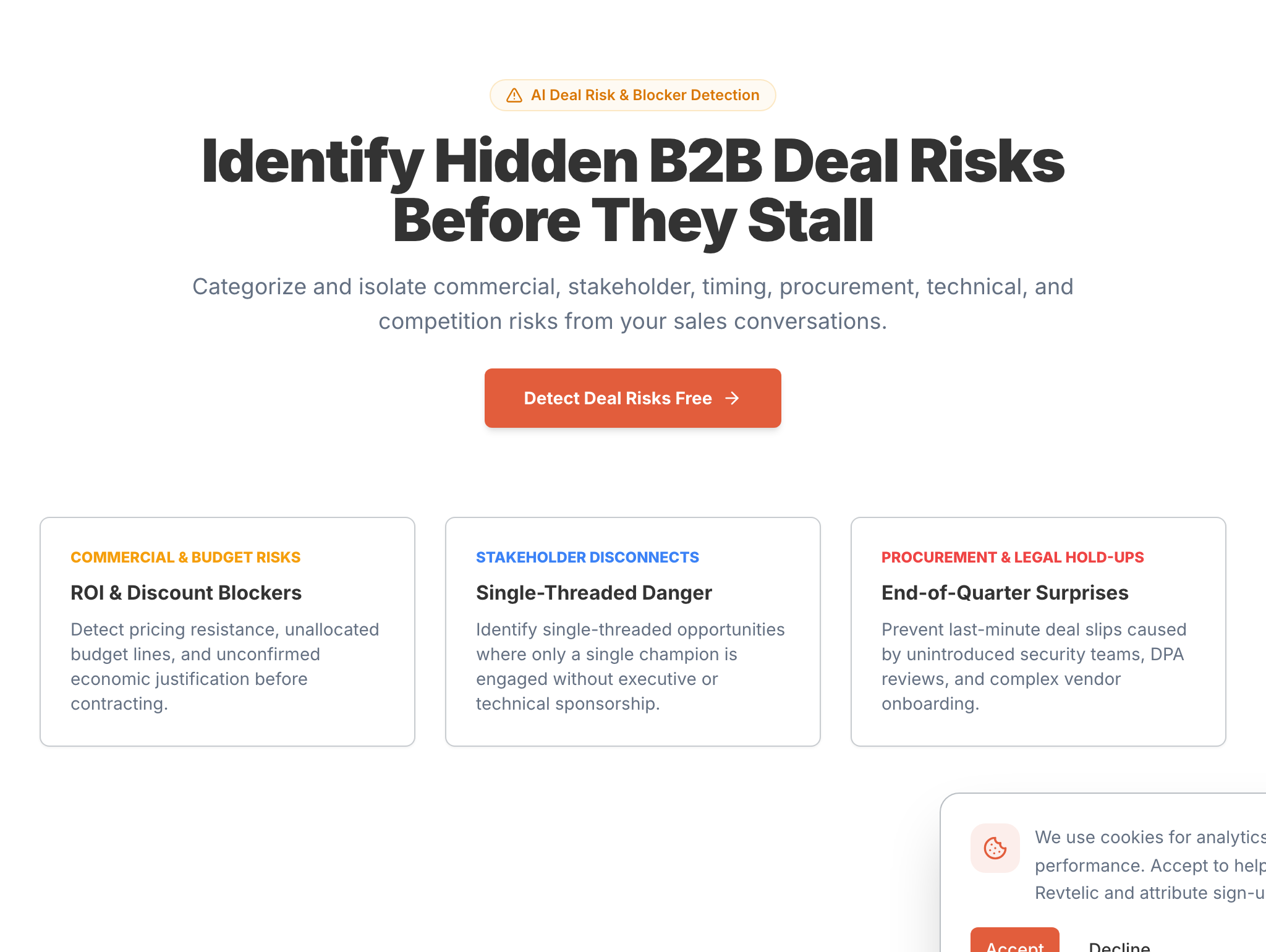
Instead of waiting for a rep to manually flag that an opportunity is in trouble, Revtelic categorizes risks into three operational tiers:
```text
Severity Tier Operational Meaning Typical Example
───────────── ─────────────────── ───────────────
High Risk (Red) Direct threat to close date or budget CFO sign-off required but unengaged; single-threaded
Medium (Amber) Velocity drag or committee friction Unscheduled Infosec review; overdue buyer MAP task
Low (Gray) Process hygiene & minor alignment items Vague next step agenda; collateral unconfirmed
```
---
## 2. The Two-Tier Risk Inspection Experience
Revtelic presents risk intelligence in two complementary layers:
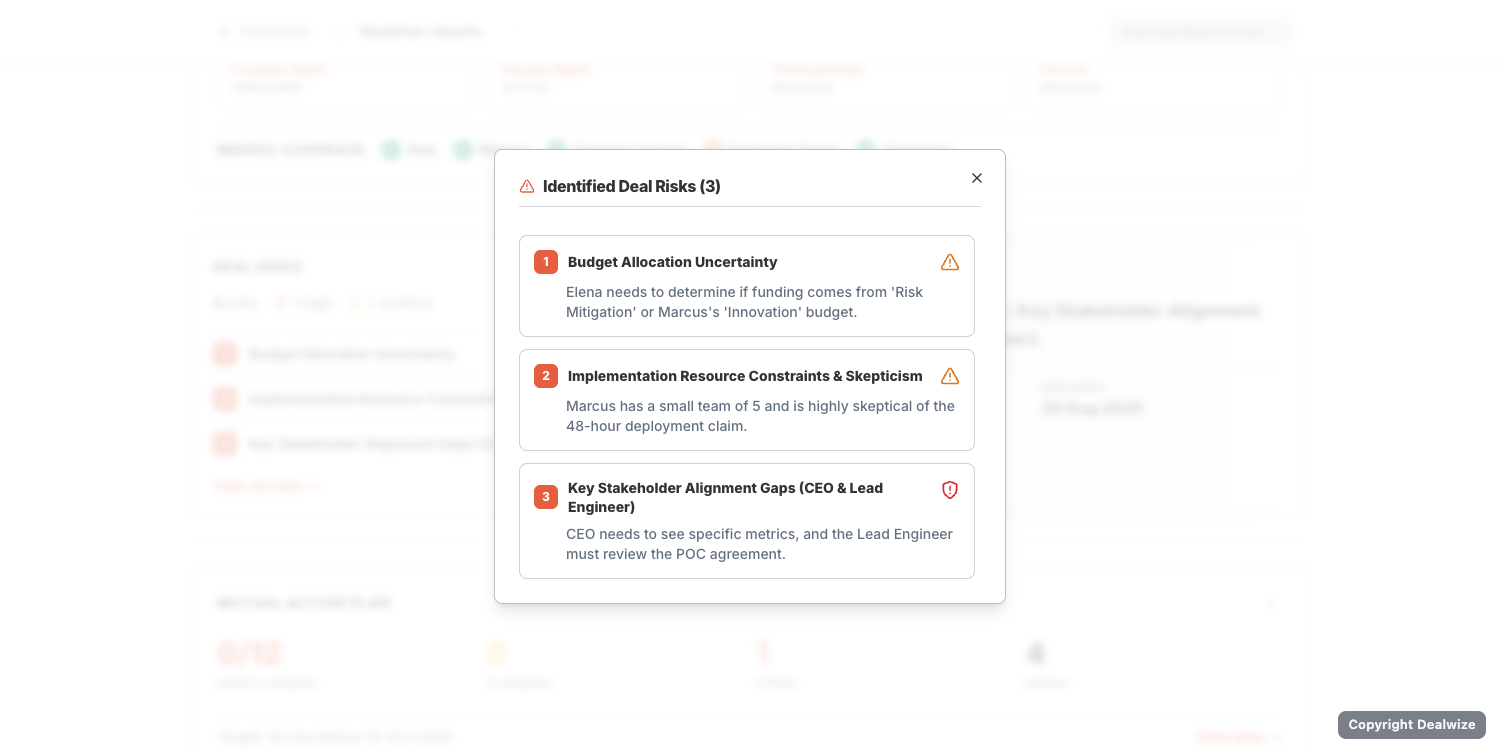
1. **The Executive Deal Tile (Main Dashboard)**: Displays the top 3 highest-priority blockers directly on your deal overview (e.g. *Budget Allocation Uncertainty*, *Implementation Resource Constraints*, *Stakeholder Alignment Gaps*), summarized with severity counts (e.g., `1 high`, `2 medium`). Directly adjacent is the **Critical Next Step**, prescribing the single highest-leverage intervention with an assigned owner and due date.
2. **The Deep-Dive Evidence Modal (`View all risks →`)**: Clicking the link opens a detailed modal displaying the complete inventory of identified blockers, along with the exact conversational quotes and buyer context backing each flag.
---
## 3. Why It Matters
In traditional sales teams, identifying deal risk relies on self-reporting. Reps naturally report good news and downplay hesitations until the end of the quarter.
By the time a manager discovers that legal redlines haven't started or that the champion is on leave, it is too late to fix.
The Deal Risk Matrix surfaces these hurdles **weeks in advance**, transforming potential deal-killers into calm, collaborative problem-solving sessions with the buyer.
---
## 4. What to Look For: The 7 Core Risk Categories
Revtelic automatically categorizes risks across seven foundational dimensions of complex B2B deals:
| Category | Typical Warning Signal | What It Threatens |
|---|---|---|
| **Commercial** | CFO sign-off required for contracts over £100k, but economic buyer not engaged. | Commercial viability & pricing approval |
| **Stakeholder** | Single-threaded account; champion lacks executive sponsor access. | Committee consensus & internal political capital |
| **Timing** | Target go-live date requires close by month-end, but vendor evaluation still open. | Forecast quarter & close date validity |
| **Procurement** | Custom legal terms requested with no redline kickoff date scheduled. | Paper process velocity & contracting lead time |
| **Technical** | Architecture integration dependencies or legacy migration concerns unaddressed. | Solution validation & technical sign-off |
| **Competition** | Prospect actively benchmarking against incumbent or lower-cost rivals. | Differentiation & margin protection |
| **Engagement** | Buyer milestones in the Mutual Action Plan untouched for $>7$ business days. | True buying intent & deal momentum |
---
## 5. What Revtelic Does: Verifiable Evidence Over Rep Sentiment
Rather than assigning generic risk flags based on seller opinion, Revtelic roots every risk in concrete conversational evidence:
1. **Transcript Evidence Citations**: Every flagged risk card displays the exact verbatim sentence and timestamp extracted from your customer calls or email threads, eliminating subjective debate between rep and manager.
2. **Scoring Impact**: The Risk Sentinel agent automatically deducts points from your Deal Health score (`-15` per High Risk, `-5` per general risk) until verified proof of resolution is detected.
3. **Critical Next Step Assignment**: Revtelic pairs each risk profile with a prescribed immediate action (e.g. *"Mitigate primary blocker: Key Stakeholder Alignment Gaps"*) with an owner and target due date.
---
## 6. What the Seller Should Do
### For the Seller: Resolving Deal Friction
When a risk is flagged on your deal report:
1. **Review the Quoted Evidence**: Read the exact customer quote backing the risk to understand the prospect's hesitation.
2. **Check the Recommended Next Step**: Review the prescribed action item generated by Revtelic.
3. **Collaborate with Your Champion**: Address the obstacle openly—for example, by offering a structured compliance review or executive-to-executive alignment call.
### For the Sales Leader: Coaching with Deal Diagnostics
During 1-on-1 deal reviews:
1. Filter your team pipeline by **High Risk** blockers.
2. Avoid asking *"Why hasn't this closed?"*
3. Ask: *"What is the specific hurdle blocking the buyer right now, and how can we help our champion remove it this week?"*
---
## Related Guides & Deep Dives
* Understand health scoring: [Understanding Deal Health & Scoring Mechanics](/docs/deals/understanding-deal-health)
* Build collaborative buyer plans: [Creating & Sharing Mutual Action Plans on the Deal Board](/docs/mutual-action-plans/creating-and-sharing-maps)
* Qualify across frameworks: [Automated Deal Qualification: MEDDIC, BANT & CHAMP](/docs/deals/qualification-meddic-bant-champ)
* Resolve objections collaboratively: [Interactive Q&A Module: Contextual Objection Resolution](/docs/deal-boards/interactive-qa-module)
---
## [Doc] Understanding Deal Health & Scoring Mechanics
URL: https://revtelic.com/docs/deals/understanding-deal-health
# Understanding Deal Health & Scoring Mechanics
A deal does not become healthy because a sales rep logs twelve emails, schedules three demos, and feels optimistic about the relationship.
In complex B2B sales, high activity often masks severe underlying uncertainty. Deal Health in Revtelic is an objective, continuous measurement of **uncertainty reduction**. It evaluates whether the buyer is providing verifiable evidence of an active decision process—or whether the deal is coasting on seller optimism toward an end-of-quarter slip.
---
## 1. What It Is
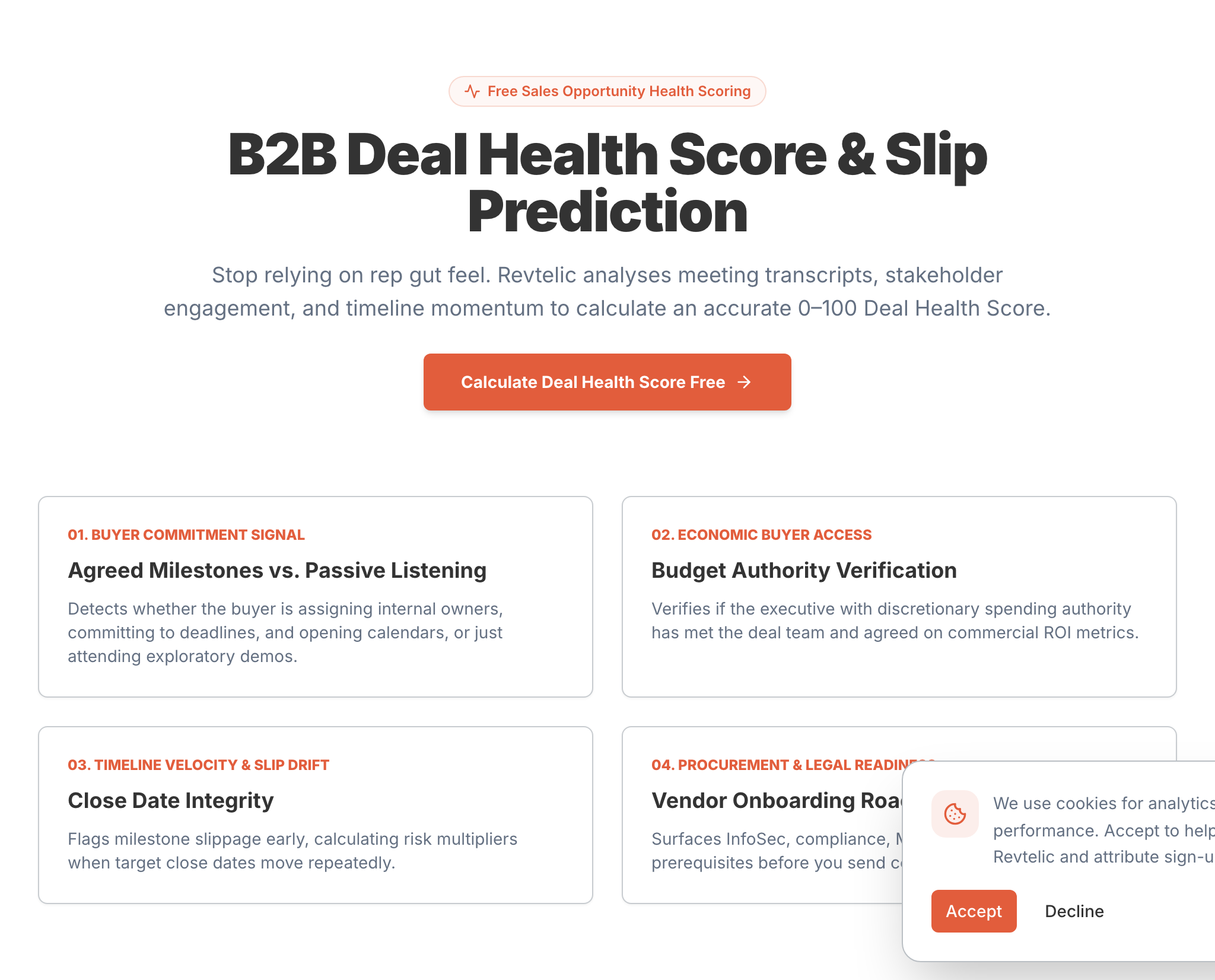
The Revtelic **Deal Health Score (0–100)** is an algorithmic assessment of opportunity viability derived from customer interactions: call transcripts, email threads, mutual action plan progress, and stakeholder engagement.
Rather than relying on subjective CRM stage probabilities (where an opportunity magically becomes "80% likely to close" simply because a proposal was sent), Deal Health weighs verified buyer commitments against known deal risk factors.
```text
Score Range Health Status Operational Meaning
─────────── ───────────────── ───────────────────
75 – 100 Strong / Healthy High verified buyer reciprocity, stakeholder alignment, milestones on track.
50 – 74 Watch / Improving Active progress, but critical gaps remain (e.g. unverified Economic Buyer).
25 – 49 At Risk Single-threaded contact, unresolved high-severity blockers, timeline drift.
0 – 24 Critical Zero recent buyer reciprocity, missed target dates, severe risk of No-Decision.
```
---
## 2. Why It Matters
Most weekly pipeline reviews are exercises in mutual storytelling:
* The seller recounts their favorite moments from the call.
* The manager questions whether the close date is realistic.
* Both look at logged activity metrics to reassure themselves that progress is being made.
This produces **forecast theatre**. The opportunity appears healthy right up until the final week of the quarter, when the customer suddenly stops replying or announces that procurement will take eight weeks.
By measuring the presence or absence of verified evidence, Deal Health removes the guesswork. It answers the fundamental question: Are we progressing the customer's buying decision, or are we just keeping ourselves busy?
---
## 3. What to Look For
When reviewing Deal Health across your pipeline, distinguish between three levels of deal reality:
| Signal Level | What It Looks Like | How Deal Health Interprets It |
|---|---|---|
| **Opinion** | *"The champion loves our vision; they're presenting it internally."* | **Zero weight.** Rep sentiment without corroborating buyer data does not increase health. |
| **Activity** | 5 calls logged, 14 emails sent, proposal viewed twice. | **Low weight.** Indicates vendor effort, but does not prove buying intent. |
| **Buyer Evidence** | CFO attended call 2; security requirements returned; mutual timeline confirmed in writing. | **High weight.** Measurable risk reduction that drives health toward 75+. |
### Key Diagnostic Warning Triggers
* **The "Happy Ears" Divergence**: A high CRM stage combined with a low Deal Health score (<50). This occurs when a rep advances a deal without securing Economic Buyer access or verified decision criteria.
* **Stage Dwell Stagnation**: An opportunity remaining in evaluation $>1.5\times$ your winning deal baseline without updated buyer evidence.
* **Asymmetric Effort**: The seller completes multiple tasks while buyer milestones in the Mutual Action Plan remain untouched for $>7$ business days.
---
## 4. What Revtelic Does: The Multi-Agent Diagnostic Engine
Revtelic continuously analyzes raw conversational data through specialized autonomous agents to construct your deal intelligence:
1. **The Brutal Truth Engine**: Synthesizes transcripts, buyer engagement, and stakeholder gaps into a single unvarnished reality statement (for example: *"You have high buyer interest, but you don't have access to the economic buyer"*), accompanied by an explicit *"What Could Kill This Deal?"* analysis.
2. **Value Architect**: Identifies the customer's core North Star business objectives, pain points, and quantifiable metrics, providing an immediate scoring lift (`+5`) when verified.
3. **Milestone Miner**: Extracts agreed deadlines, milestones, and deliverables to populate the Mutual Action Plan (`+5` scoring lift).
4. **Risk Sentinel**: Continuously scans for friction, authority gaps, and timeline drift—deducting points for high-severity blockers (`-15`) and operational risks (`-5`).
5. **Qualification Framework Blending**: Calculates real-time evidence coverage across **MEDDIC**, **CHAMP**, or **BANT** (Pain, Metrics, Decision Criteria, Economic Buyer, Champion), blending framework completeness directly into the overall Deal Health score.
---
## 5. What the Seller Should Do
### For the Seller: Gaining Clarity and Confidence
When Deal Health flags an opportunity in the Watch or At Risk zone:
1. **Read The Brutal Truth**: Check the unvarnished diagnostic at the top of your report to see the root cause of friction.
2. **Review Stakeholder Coverage**: Toggle between MEDDIC, CHAMP, or BANT to see who is missing (e.g. Economic Buyer marked `UNKNOWN`).
3. **Execute the Recommended Next Step**: Use the next interaction to secure the missing proof rather than sending another generic check-in email.
### For the Sales Leader: Coaching with Evidence
During 1-on-1 pipeline audits:
1. Filter your team pipeline by **Watch** and **At Risk** opportunities.
2. Replace *"How do you feel about this deal?"* with *"What buyer action from this week's calls justifies keeping this in the current commit?"*
3. Coach the rep on multithreading techniques to engage the true Economic Buyer before the quarter draws to a close.
---
## Related Guides & Deep Dives
* Detect hidden blockers: [Managing and Resolving Deal Risks: The Deal Risk Matrix](/docs/deals/risk-detection-and-matrix)
* Build collaborative plans: [Creating & Sharing Mutual Action Plans on the Deal Board](/docs/mutual-action-plans/creating-and-sharing-maps)
* Track sales methodologies: [Automated Deal Qualification: MEDDIC, BANT & CHAMP](/docs/deals/qualification-meddic-bant-champ)
* Measure buyer engagement: [Buyer Engagement Telemetry & Behavioral Analytics](/docs/deal-boards/buyer-engagement-analytics)
---
## [Doc] Signing In: Google OAuth, Work Email & Team Workspaces
URL: https://revtelic.com/docs/getting-started/account-creation-and-login
# Signing In: Google OAuth, Work Email & Team Workspaces
You’re here to close deals, not configure complex user directories. Revtelic supports one-click Google single sign-on (SSO), secure email authentication, and automatic corporate domain matching so you can get from login to your pipeline in seconds.
---
## 1. Sign In with Google (Recommended)
If your team runs on Google Workspace, you can sign in with one click without creating separate credentials:
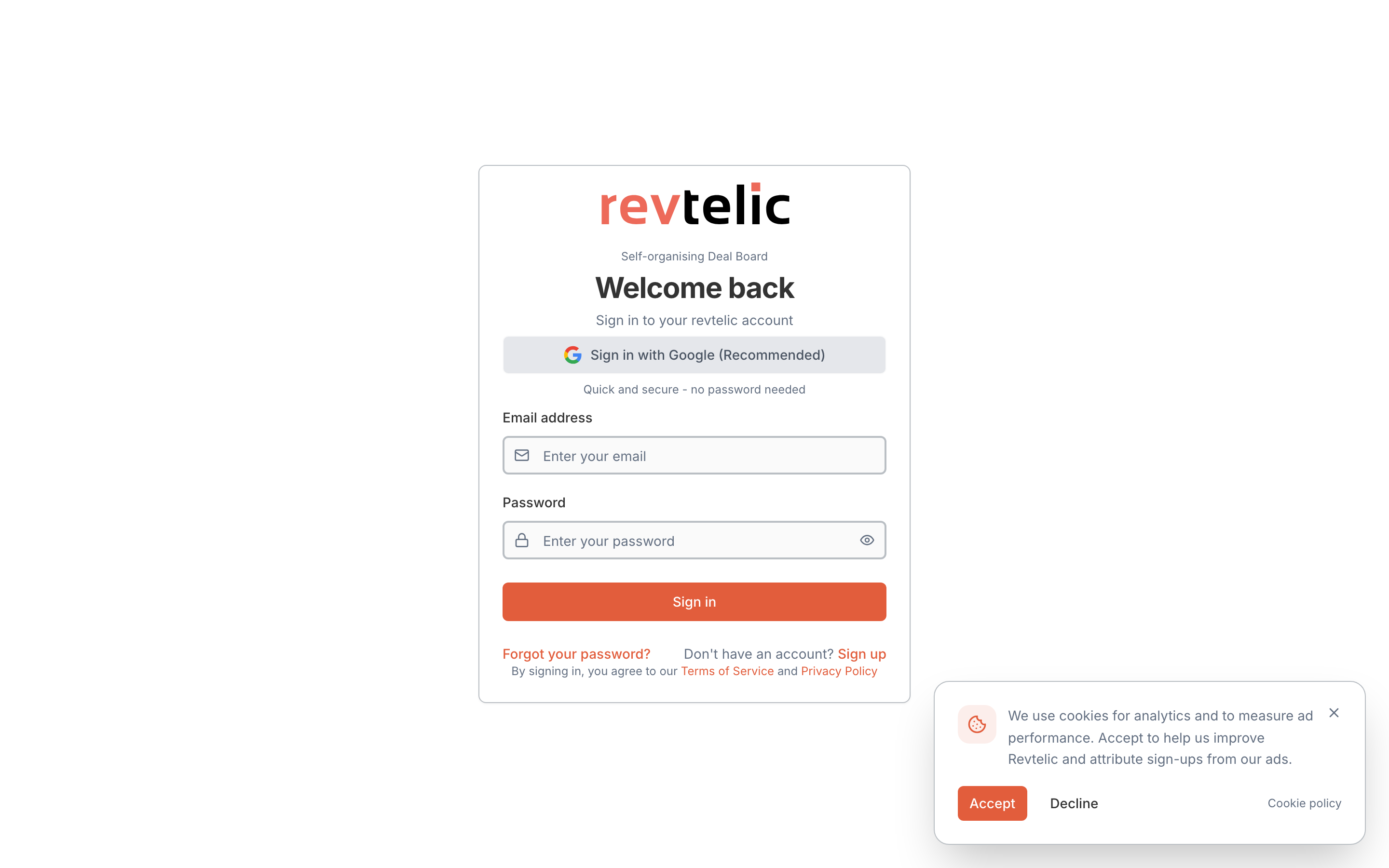
1. Head to [app.revtelic.com/auth/login](https://app.revtelic.com/auth/login).
2. Click **Sign in with Google (Recommended)**.
3. Select your work Google account.
> [!TIP]
> **Automatic Team Detection:** If your colleagues already have a Revtelic workspace for your corporate domain (e.g. `@acmecorp.com`), you will be automatically routed straight into your company's shared organization as a team member. No manual invite links required.
---
## 2. Sign In with Work Email and Password
If you prefer using credentials directly:
1. Enter your work email and password on the login screen.
2. Click **Sign In**.
3. **Forgot your password?** Click **Forgot password?** to receive a secure password reset link in your inbox.
### Creating a New Account
If your team is new to Revtelic:
1. Go to [app.revtelic.com/auth/register](https://app.revtelic.com/auth/register).
2. Enter your name, corporate email, and password.
3. Revtelic automatically provisions your organization and assigns your team workspace.
---
## 3. How Workspaces Work
Revtelic provisions workspaces dynamically based on your email domain:
* **Corporate Email Domains (`@yourcompany.com`):** If you are the first person from your company to sign up, Revtelic creates a shared company organization on a trial plan. When your teammates sign up with the same email domain, they automatically join your company's workspace.
* **Public Email Domains (`@gmail.com`, etc.):** If you register with a public address, Revtelic provisions a personal workspace for your individual deals.
* **Organization Administration:** Organization administrators can manage company details and member seats under **Settings > Organization**.
---
## 4. Next Steps: Setting Up Integrations
Once inside your workspace:
* **API & Remote MCP:** Head to **Settings > Integrations** to generate your `dw_live_...` API key for connecting web AI agents or Cursor.
* **Inspect Your Deals:** Forward your first call transcript to `agent@mail.revtelic.com` or paste it directly into the web analyzer.
---
## What to Explore Next
* [5-Minute Quickstart: Turn Call Transcripts into Closed Deals](/docs/getting-started/quickstart)
* [Connecting Revtelic via Remote Model Context Protocol (MCP)](/docs/llm-and-ai-integrations/model-context-protocol-mcp)
* [Understanding Deal Health & Scoring Mechanics](/docs/deals/understanding-deal-health)
---
## [Doc] Generating Deal Health One-Pagers: Via Email or Web
URL: https://revtelic.com/docs/getting-started/generating-deal-health-one-pager
# Generating Deal Health One-Pagers: Via Email or Web
The **Deal Health One-Pager** is Revtelic’s signature diagnostic command center. Instead of forcing reps to spend hours manually logging qualification fields into a CRM, Revtelic ingests raw meeting transcripts and customer email threads, instantly synthesizing them into an objective, single-page deal diagnosis.
Revtelic provides two frictionless ingestion methods to generate your One-Pager:
```
┌───────────────────────────────────────────────┐
│ Raw Customer Conversation │
│ Meeting Transcripts • Summaries • Emails │
└──────────────────────┬────────────────────────┘
│
Choose Your Preferred Ingestion Path:
│
┌───────────────────────┴───────────────────────┐
▼ ▼
┌───────────────────────┐ ┌───────────────────────┐
│ Via Email │ │ Via the Web │
│ Forward to: │ │ Paste directly into: │
│ agent@mail.revtelic.com│ │ app.revtelic.com/ │
│ │ │ analyze │
└───────────┬───────────┘ └───────────┬───────────┘
│ │
└───────────────────────┬───────────────────────┘
│
Multi-Agent Processing
(~30 Seconds)
│
▼
┌───────────────────────────────────────────────┐
│ The Deal Health One-Pager │
│ • 0–100 Health Gauge • Brutal Truth │
│ • Stakeholder Coverage • Blocker Risks │
│ • Critical Next Step • Mutual Action Plan │
└───────────────────────────────────────────────┘
```
---
## Method 1: Generating the One-Pager Via Email
The fastest way to generate a One-Pager during a busy sales day is via your email client. You never have to switch tabs or log into the application.
### 1. Supported Meeting Sources
You can forward notes or transcripts exported from any conversation intelligence platform or video conferencing tool:
* **Meeting Recorders**: Gong, Chorus, Fathom, Fireflies, Grain, Otter.ai
* **Conferencing Tools**: Zoom transcripts, Google Meet automated notes, Microsoft Teams summaries
* **Direct Customer Threads**: Email chains with prospects containing scoping discussions, security questionnaires, or commercial proposals
### 2. Forwarding to the AI Agent
1. Open the transcript or email thread in your email client.
2. Forward the message to:
```text
To: agent@mail.revtelic.com
Subject: [Company Name] - [Meeting Context]
```
*(Example: `Subject: Meridian Logistics - Technical Evaluation & Architecture Review`)*
3. Ensure the transcript body contains meaningful conversation text (minimum ~400 characters).
4. Click **Send**.
### 3. Smart Parsing & Silent Stakeholder Mapping
When your email reaches Revtelic:
* **Quote Cutting**: Historical email headers (e.g. *"On Thu, Oct 12 wrote..."*) and email signatures are automatically stripped, focusing the agent strictly on the latest conversation.
* **Silent Stakeholder Registration**: Contacts included in the `To` and `CC` lines are parsed and matched against your deal's stakeholder committee.
* **Instant Delivery**: Within 30 seconds, Revtelic processes the transcript through our multi-agent pipeline and emails you a direct link to your generated Deal Health One-Pager.
> [!TIP]
> **Updating an Existing Dealboard via Email**: To add notes to an existing deal rather than creating a new one, include the Dealboard ID in your subject line (`Subject: Meridian Logistics [dealboard:2f2b96ab-950a-...]`) or forward to `agent+@mail.revtelic.com`.
---
## Method 2: Generating the One-Pager Via the Web
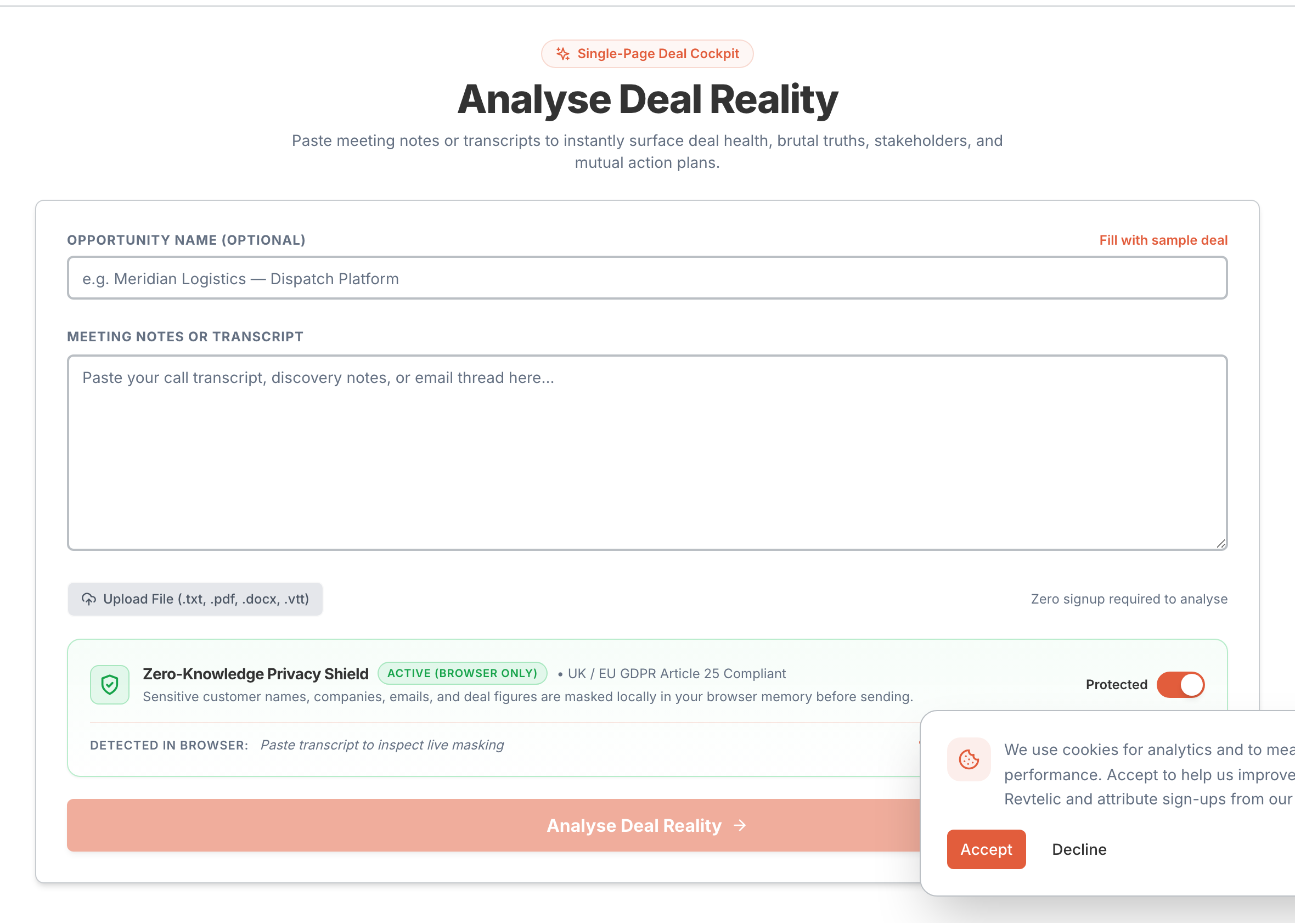
If you prefer an interactive workflow or want to test sample notes before creating an account, use the in-browser Web Analyzer.

### Path A: The In-App Web Analyzer (`/analyze`)
For authenticated users working inside Revtelic:
1. Navigate to **Analyze** in the top navigation or head directly to `app.revtelic.com/analyze`.
2. Paste your meeting transcript, call notes, or prospect requirements into the text area.
3. Provide the **Deal Name** and select or confirm your company organization.
4. Click **Analyze Conversation**.
5. Watch the Revtelic agents extract goals, risks, and next steps in real time. The generated Deal Health One-Pager loads immediately in your browser.
### Path B: Updating an Active Deal Board (`MicrositeDetail.tsx`)
When running a deal that already has an established Deal Board:
1. Open your Deal Board (`/deal-boards/[id]`).
2. Click the **Generate AI Health Score** button with the sparkle icon (`Sparkles`).
3. Paste the latest call notes or follow-up transcript into the dialog.
4. Click **Generate**.
5. Revtelic uses incremental state diffing (`compute_diff.py`) to update your health score, surface newly discovered risks, and append newly agreed milestones without overwriting your existing tasks.
### Path C: Public No-Login Interactive Demo (`/deal-health-one-pager`)
For prospective team members evaluating Revtelic:
1. Visit the public demo page at `revtelic.comm/deal-health-one-pager` or `revtelic.comm/try`.
2. Click **Try with Sample Transcript** or paste your own sanitized meeting notes.
3. Preview the fully functional, interactive Deal Health One-Pager directly in your browser without creating an account or entering credit card details.
---
## Anatomy of the Deal Health One-Pager
Every generated One-Pager synthesizes the deal across seven standardized diagnostic cards:
| Card | Primary Metric | What It Reveals |
| :--- | :--- | :--- |
| **1. Header Summary** | Metadata | Deal name, target close date, rep owner, stage, and company branding logo. |
| **2. Deal Health Scale** | `0–100% Score` | Objective deal vitality (**Healthy**, **Watch**, **At Risk**, **Critical**) calculated from conversation evidence. |
| **3. The Brutal Truth** | Unvarnished Diagnosis | Direct reality statement answering *"What could kill this deal?"* before end-of-quarter surprises. |
| **4. Critical Next Step** | Immediate Intervention | The single highest-leverage operational task required this week to restore momentum. |
| **5. Stakeholder Coverage** | Buying Committee | Identified contacts mapped to roles (Champion, Economic Buyer, Evaluator) with verbatim quote evidence. |
| **6. Deal Risks Minimal** | Blocker Matrix | Active deal blockers categorized into the 7 canonical risk types with High/Med/Low severity tags. |
| **7. Mutual Action Plan** | Milestone Roadmap | Chronological phase milestones with assigned owners, deadlines, and verification checkboxes. |
---
## Next Steps: Sharing & Driving Deal Velocity
Once your One-Pager is generated, you can leverage it across your sales cycle:
* **Internal Deal Reviews**: Share the One-Pager URL with your sales manager during 1-on-1 pipeline reviews to anchor discussions in empirical evidence.
* **Email Digest**: Click **Share** -> **Email Digest** to distribute a high-level diagnostic summary to executive sponsors.
* **Client-Facing Deal Board**: Seamlessly transition from your internal diagnostic view into the collaborative buyer-facing Deal Board (`/deal-boards/[id]`) to share the Mutual Action Plan with your prospect champion.
---
## Related Guides & Deep Dives
* Master scoring mechanics: [Understanding Deal Health & Scoring Mechanics](/docs/deals/understanding-deal-health)
* Identify deal blockers early: [Risk Detection & The Blocker Matrix](/docs/deals/risk-detection-and-matrix)
* Structure sales methodologies: [Automated Deal Qualification: MEDDIC, BANT & CHAMP](/docs/deals/qualification-meddic-bant-champ)
* Build collaborative buyer plans: [Creating & Sharing Mutual Action Plans](/docs/mutual-action-plans/creating-and-sharing-maps)
---
## [Doc] 5-Minute Quickstart: Turn Call Transcripts into Closed Deals
URL: https://revtelic.com/docs/getting-started/quickstart
# 5-Minute Quickstart
Welcome to Revtelic. This guide will walk you through setting up your workspace, connecting your first deal, and letting your AI Sales Agent automatically extract MEDDPICC signals, calculate Deal Health, and build a customer-ready Mutual Action Plan.
---
## Step 1: Forward Your First Call or Email Thread
You don’t need to spend 45 minutes configuring custom fields. The fastest way to test Revtelic is to forward an existing customer conversation:
1. Open your meeting recorder (Gong, Chorus, Fathom, Zoom, or Google Meet).
2. Export or copy the meeting transcript, summary, or email thread with your prospect.
3. Forward it to your dedicated agent address: `agent@mail.revtelic.com`.
```text
To: agent@mail.revtelic.com
Subject: Acme Corp - Technical Evaluation Sync
[Paste transcript or meeting notes here]
```
Within 30 seconds, your AI Sales Agent parses the entire conversation, matches it to your company workspace, and generates an objective **Deal Health Report**.
> [!TIP]
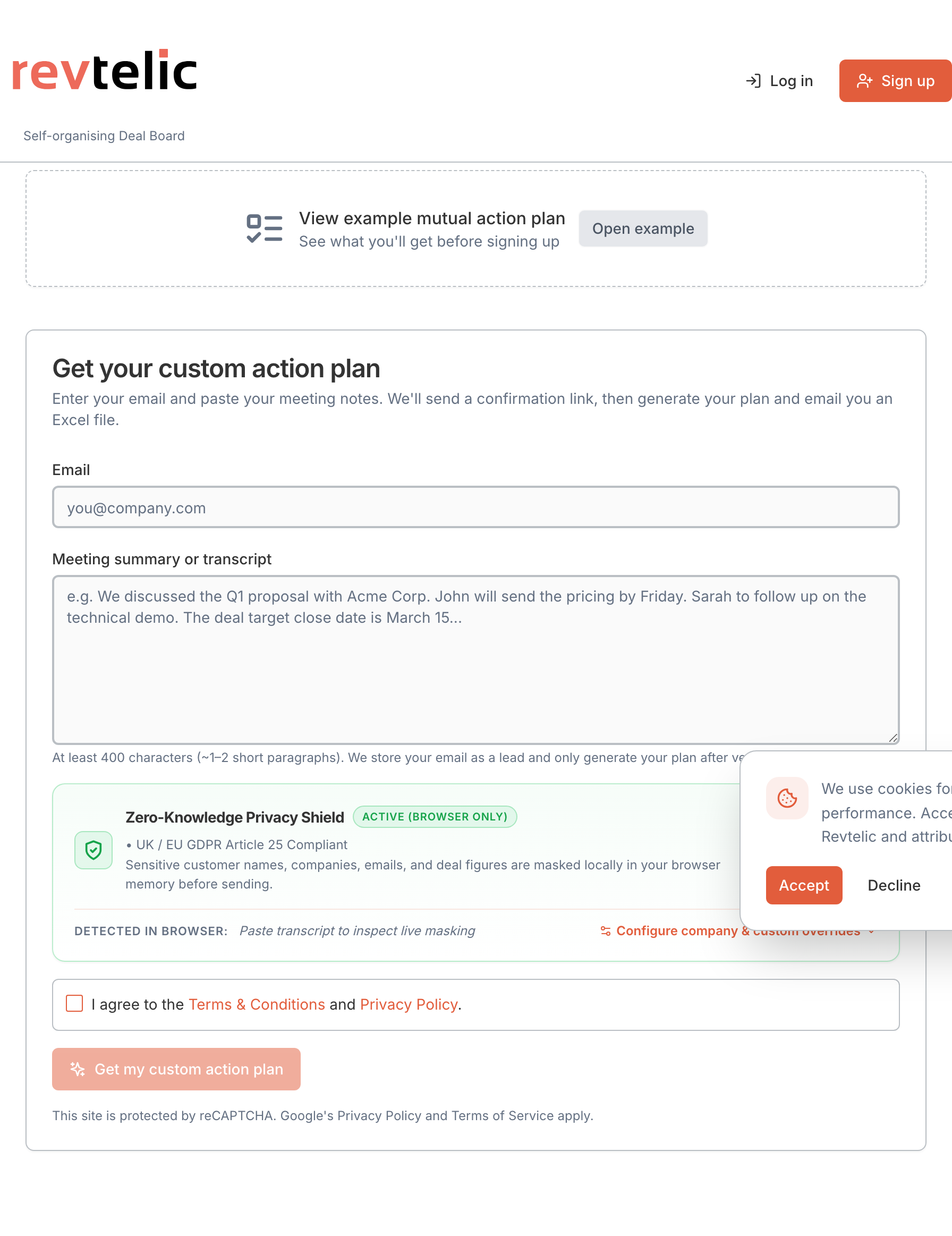
> **Prefer pasting in your browser?** You can also paste raw transcripts or call notes directly into the web analyzer at [app.revtelic.com/analyze](https://app.revtelic.com/analyze) for instant scoring without sending an email.
---
## Step 2: Review Your Deal Health Score

Head to your Deal Health report in your workspace at `app.revtelic.com/deal-health//` (for example, `https://app.revtelic.com/deal-health/abc-corp/shieldflow-nexafin-20260904142324`) to review the extracted insights:
* **The Health Gauge (0–100):** A multi-signal score measuring buyer responsiveness, stakeholder depth, and timeline risk.
* **Brutal Truth Diagnostics:** Objective risk flags (e.g., *"No Economic Buyer identified"*, *"Stage dwell time exceeds 21 days"*).
* **Automated MEDDPICC:** Extracted Metrics, Economic Buyer, Decision Criteria, and Identified Pain points cited directly from transcript timestamps.
---
## Step 3: Publish Your Mutual Action Plan on the Deal Board
Revtelic automatically organizes next steps into a collaborative roadmap on your buyer-facing Deal Board:
1. Open your deal's shared **Deal Board**:
`https://app.revtelic.com/deal-boards/` (for example, `https://app.revtelic.com/deal-boards/2f2b96ab-950a-4df7-9bf8-01883048ebdb`).
2. Review the auto-generated milestones (Security Review, Legal Redlines, Executive Sign-off) and assigned owners.
3. Share the Deal Board link directly with your champion to keep both teams aligned.
> [!TIP]
> When your buyer clicks the shared Deal Board link, downloads a security document, or marks a task complete, Revtelic feeds that activity directly into your **Deal Health Score**, confirming genuine deal velocity.
---
## What to Explore Next
* [Signing In & Team Workspaces](/docs/getting-started/account-creation-and-login)
* [Connecting Revtelic via Model Context Protocol (MCP)](/docs/llm-and-ai-integrations/model-context-protocol-mcp)
* [Generating Deal Health One-Pagers: Via Email or Web](/docs/getting-started/generating-deal-health-one-pager)
* [Creating & Sharing Mutual Action Plans on the Deal Board](/docs/mutual-action-plans/creating-and-sharing-maps)
---
## [Doc] Managing Team Access: Roles, Permissions & Workspace Seats
URL: https://revtelic.com/docs/getting-started/team-access-and-roles
# Managing Team Access: Roles, Permissions & Workspace Seats
Enterprise sales is a team sport. Account Executives, Solutions Engineers, Sales Managers, and Deal Desk need to collaborate seamlessly across deal diagnoses, Mutual Action Plans, and pipeline reviews.
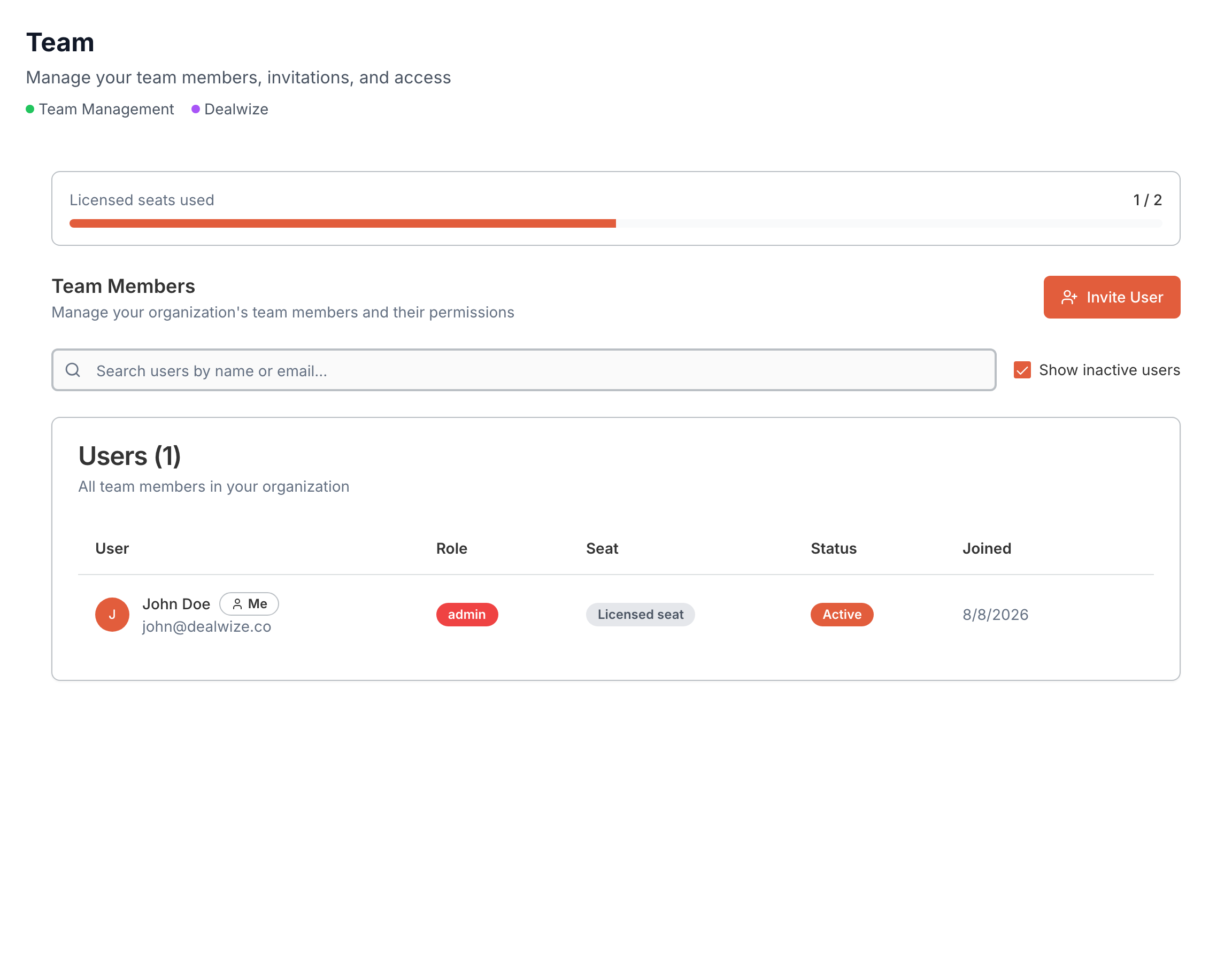
Revtelic provides centralized team management (`app.revtelic.com/team`) allowing administrators to invite colleagues, manage license seats, control permissions, and designate task owners across opportunities.
---
## 1. Workspace Roles & Permissions
Internal users in your Revtelic workspace belong to one of two primary roles:
| Role | Primary Responsibilities | Administrative Capabilities |
| :--- | :--- | :--- |
| **Admin (Org Owner)** | Sales Leadership, Revenue Operations, Founders | Full administrative control over organization settings, custom branding, and billing seats. Can invite, edit, and offboard users. Access to all team dealboards and pipeline diagnoses. |
| **Member** | Account Executives, Solutions Engineers, Deal Desk | Can create, analyze, and edit assigned dealboards. Can assign teammates to MAP action items, log call transcripts, and run deal reviews. |
### Granular Permission Checks
Under the hood, Revtelic enforces permission checks (`usePermissionCheck.ts`) across key actions:
* **`canInviteUser`**: Authority to send invitations to new colleagues within available seat licenses.
* **`canManageUser`**: Authority to edit team roles or offboard departing members.
* **`canReadUser`**: Visibility into the organization roster and team seat capacity.
---
## 2. Inviting Colleagues to Your Workspace
To add team members to your organization:
1. Log in to [app.revtelic.com](https://app.revtelic.com) and select **Team** from the main navigation.
2. In the top banner, review your **Seat Usage** (licensed seats, active members, and pending invitations).
3. Click **Invite Member**.
4. Enter your colleague's corporate email address and select their assigned role (**Admin** or **Member**).
5. Click **Send Invitation**.
### Corporate Domain Auto-Routing
If your organization has corporate domain matching enabled (e.g. `@acme.com`), new team members who sign in with their corporate Google SSO or work email are automatically routed into your shared workspace—bypassing manual invite acceptance.
---
## 3. Assigning Team Members to Action Items
In complex evaluations, different internal team members own different sales deliverables. Revtelic allows reps to assign internal colleagues directly to Mutual Action Plan line items:
```
Action Item: "Configure Tailored Enterprise Sandbox"
Assigned To: Alex Rivera (Solutions Engineer) [Internal Team Member]
Deadline: 14-Sep-2026
Status: In Progress
```
### Internal vs. External Assignee Typing
Revtelic cleanly distinguishes between internal colleagues and external prospect stakeholders:
* **Internal Assignees (`user:id`)**: Drawn from your workspace team roster. Assignees receive task notifications and can log updates directly from their Revtelic dashboard.
* **External Assignees (`stakeholder:id`)**: Drawn from buying committee contacts. Displayed on the public Deal Board with their customer organization tag.
---
## 4. Seat Licensing & Capacity Management
Revtelic manages workspace licenses through automated Stripe subscription integration:
* **Billable Seats (`max_billable_seats`)**: The total number of active member licenses allocated to your plan.
* **Seat Capacity Alert**: When all licensed seats are filled (active members + pending invitations), the system automatically prevents unauthorized invitations and prompts administrators to add seats under **Settings > Billing**.
* **Inactive & Suspended Users**: Administrators can toggle view filters to inspect active versus inactive users, ensuring licenses are only allocated to active team members.
---
## 5. Offboarding & Deal Re-assignment
When an Account Executive transitions accounts or leaves the company, pipeline momentum must not be disrupted:
1. Open **Team Management** (`/team`) and locate the user row.
2. Click the action menu and select **Offboard User**.
3. In the offboarding modal, select the designated replacement team member.
4. Revtelic automatically reassigns:
* All active Deal Boards and deal health records.
* All open Mutual Action Plan action items where the departing rep was listed as the owner.
* Internal deal coaching notes and historical transcript associations.
This ensures that incoming reps can step into existing enterprise evaluations with zero lost context.
---
## Related Guides & Deep Dives
* [Signing In: Google OAuth, Work Email & Team Workspaces](/docs/getting-started/account-creation-and-login)
* [External Stakeholder Access: Read-only vs. Collaborate Permissions](/docs/deal-boards/stakeholder-access-and-permissions)
* [Creating & Sharing Collaborative Mutual Action Plans](/docs/mutual-action-plans/creating-and-sharing-maps)
---
## [Doc] Workspace Settings & Administration: Profile, Integrations, Organization & Billing
URL: https://revtelic.com/docs/getting-started/workspace-settings-and-administration
# Workspace Settings & Administration
Revtelic provides a centralized settings hub (`/settings`) where team members and workspace administrators configure personal profiles, manage external AI agent connections, customize company branding, and govern subscription billing.
Settings are organized into a modular tabbed interface (`SettingsTabs.tsx`) protected by role-based permission checks:
```
┌────────────────────────────────────────────────────────────────────────┐
│ Revtelic Settings Architecture │
├────────────────────────────────────────────────────────────────────────┤
│ Available to All Workspace Members: │
│ 1. Profile • Personal info, photo avatar, password security │
│ 2. Integrations • MCP API keys, Claude / Cursor / ChatGPT tokens │
│ │
│ Restricted to Organization Admins (Org Owners): │
│ 3. Organization • Company info, logo branding, custom domains, │
│ qualification framework defaults │
│ 4. Subscription • Plan tiers, seat limits, storage, AI quotas │
│ 5. Billing & Invoices • Stripe customer portal, payment cards, PDFs │
└────────────────────────────────────────────────────────────────────────┘
```
> [!NOTE]
> Standard **Members** see only the **Profile** and **Integrations** tabs. The **Organization**, **Subscription**, and **Billing & Invoices** tabs are strictly restricted to users with the **Admin** role (`usePermissionCheck.ts`). If a trial or subscription lapses, administrators are automatically routed directly to the Subscription tab to restore workspace access before continuing normal operations.
---
## 1. Profile Settings (Personal Account)
The **Profile** tab (`ProfileTab.tsx`) allows individual users to manage their personal credentials, contact identity, and security preferences.
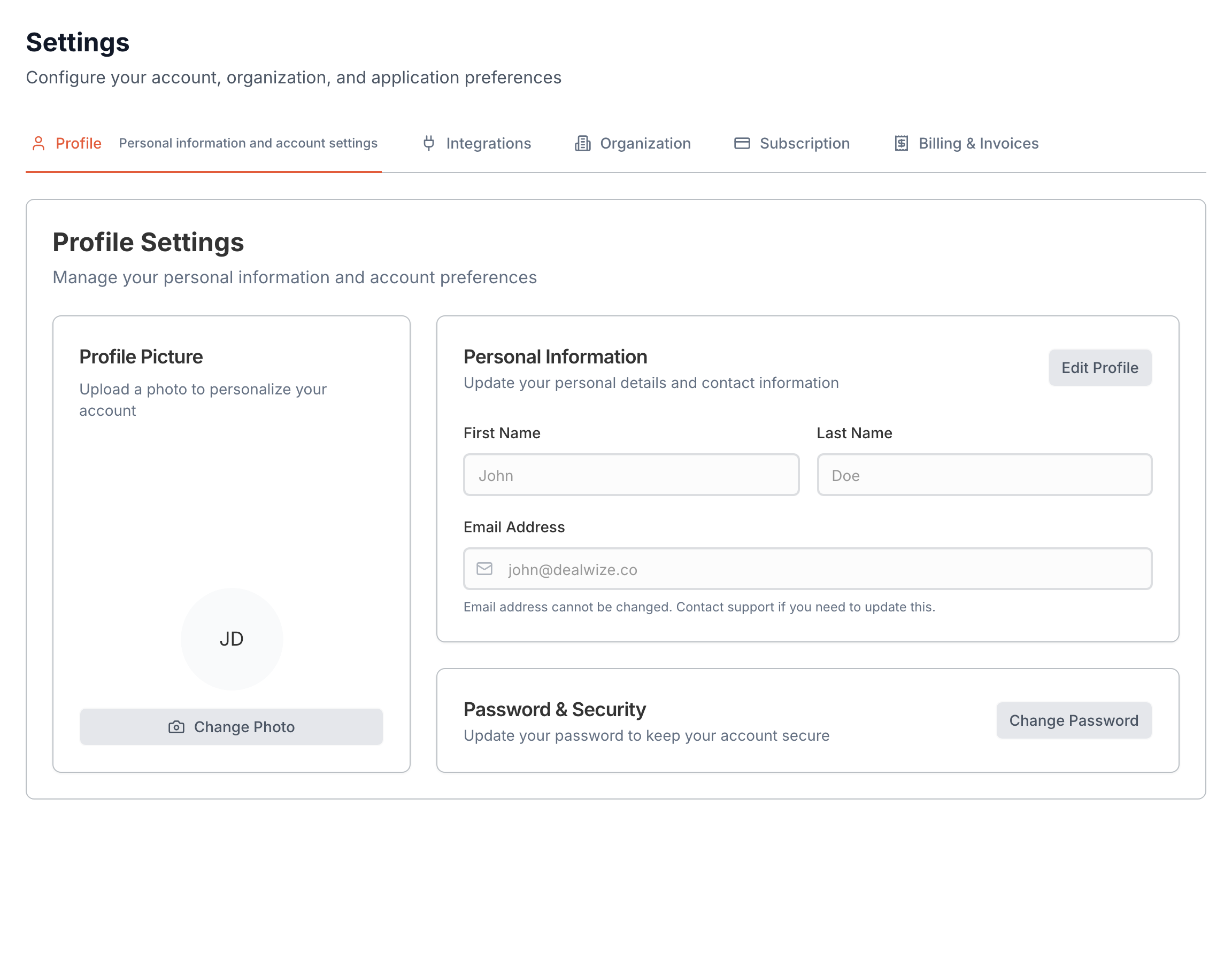
### Personal Information & Avatar
* **Name & Contact**: Update your first name, last name, and display email address. These details appear across internal Deal Board task assignments and external Mutual Action Plan milestone owner cards.
* **Photo Avatar Upload**: Upload a professional headshot (JPG, PNG, WebP). Avatars are stored in secure object storage and served using authenticated signed URLs (`useAvatarUrl.ts`), ensuring high-resolution rendering without exposing persistent public storage links.
* **Workspace Role Display**: View your current organizational assignment and active role badge (**Admin** vs. **Member**).
### Password & Security Management
For accounts authenticated via work email and password:
1. Enter your **Current Password** to verify identity.
2. Provide a **New Password** meeting enterprise complexity standards.
3. Confirm your new password and toggle visibility using the show/hide eye icon.
4. Click **Update Password** to immediately rotate credentials across all active sessions.
> [!TIP]
> If your organization logs in via **Google Workspace SSO**, your authentication is managed upstream by your identity provider. Password change fields are automatically hidden for SSO accounts.
### Account Removal
If an individual team member needs to leave the organization or delete their user account, the Profile tab provides a verified account deletion workflow. For organization owners, transferring administrative ownership or reviewing the organization cascade deletion summary is required before removing the primary account.
---
## 2. Integrations & API Keys (External AI & MCP)
The **Integrations** tab (`IntegrationsTab.tsx`) manages programmatic access keys for connecting Revtelic to external Large Language Models (LLMs) and IDE agents via the **Model Context Protocol (MCP)**.
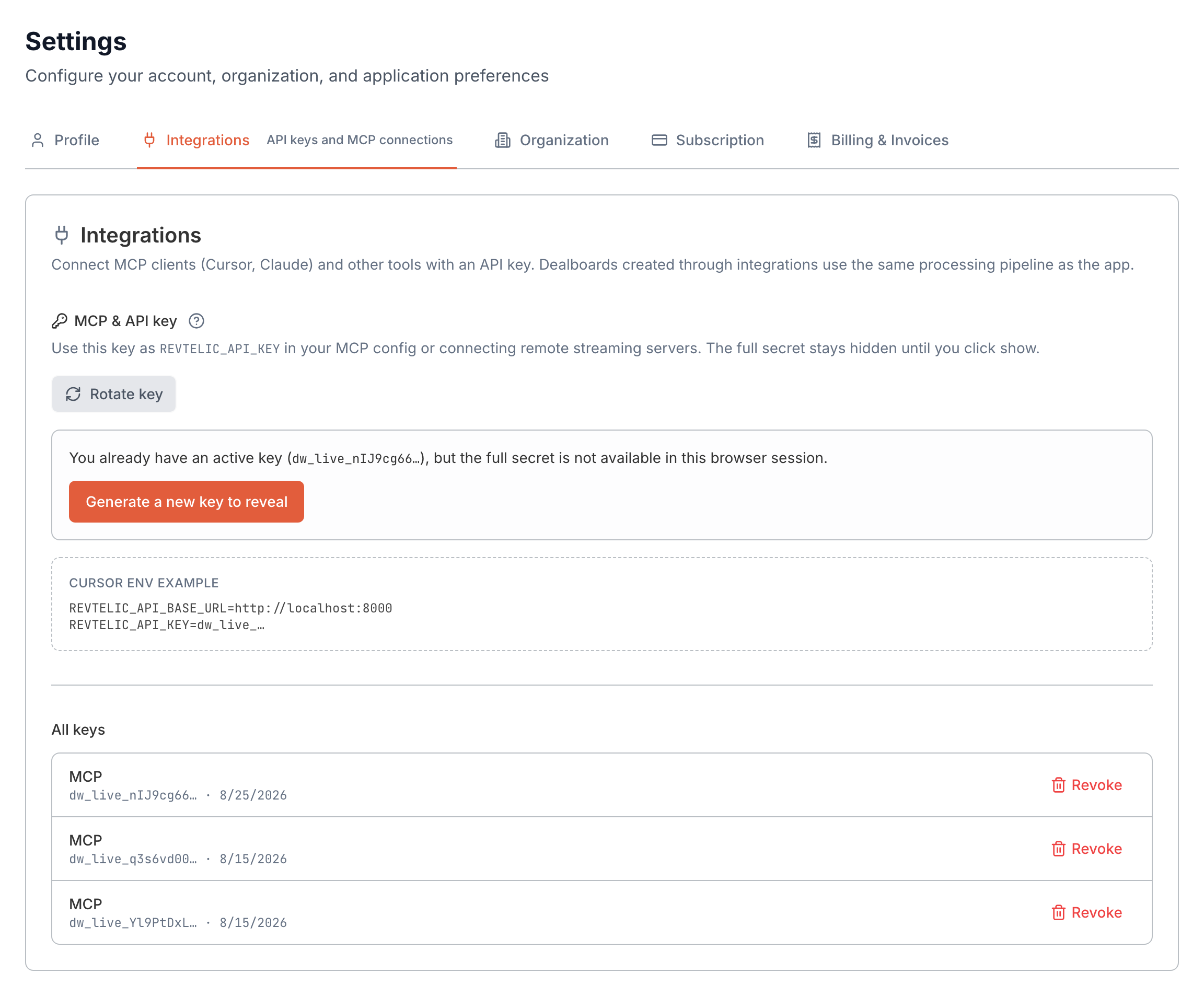
### MCP API Key Lifecycle
Revtelic utilizes tokenized API keys with the canonical prefix `dw_live_`:
| Key Attribute | Value / Format | Security Behavior |
| :--- | :--- | :--- |
| **Prefix** | `dw_live_...` | Distinctly identifies live production Revtelic integration keys. |
| **Masked Display** | `dw_live_••••••••••••3a8f` | Displays only the key prefix and trailing characters after initial creation. |
| **One-Time Reveal** | Secure Reveal Dialog | The raw secret is displayed once upon generation with a one-click copy button. |
| **Instant Revocation** | Immediate (`revoked_at`) | Revoking an active key immediately cuts off all external MCP sessions. |
### Connecting External AI Clients
Once your API key is generated, connect your preferred AI agent environment:
* **Claude Web & Claude Desktop**: Use Revtelic's remote Streamable HTTP / Server-Sent Events (SSE) endpoint:
```json
{
"mcpServers": {
"revtelic": {
"url": "https://api.revtelic.comm/api/v1/mcp/sse",
"headers": {
"Authorization": "Bearer dw_live_YOUR_API_KEY"
}
}
}
}
```
* **Cursor & IDE Extensions**: Add Revtelic as a remote SSE MCP server in `.cursor/mcp.json` to inspect live dealboards, qualification completeness, and customer objections directly within your coding editor.
* **ChatGPT & Custom GPTs**: Configure an Actions integration using OpenAPI schemas authenticated via the Bearer API key.
For complete tool schemas and setup walkthroughs, see the [Model Context Protocol (MCP) Guide](/docs/llm-and-ai-integrations/model-context-protocol-mcp) and [Connecting with Claude Desktop](/docs/llm-and-ai-integrations/connecting-with-claude-desktop).
---
## 3. Organization & Branding
The **Organization** tab (`OrganizationTab.tsx`) is the command center for enterprise workspace administrators. It governs company identity, shared Deal Board branding, white-labeled domains, and sales qualification defaults.
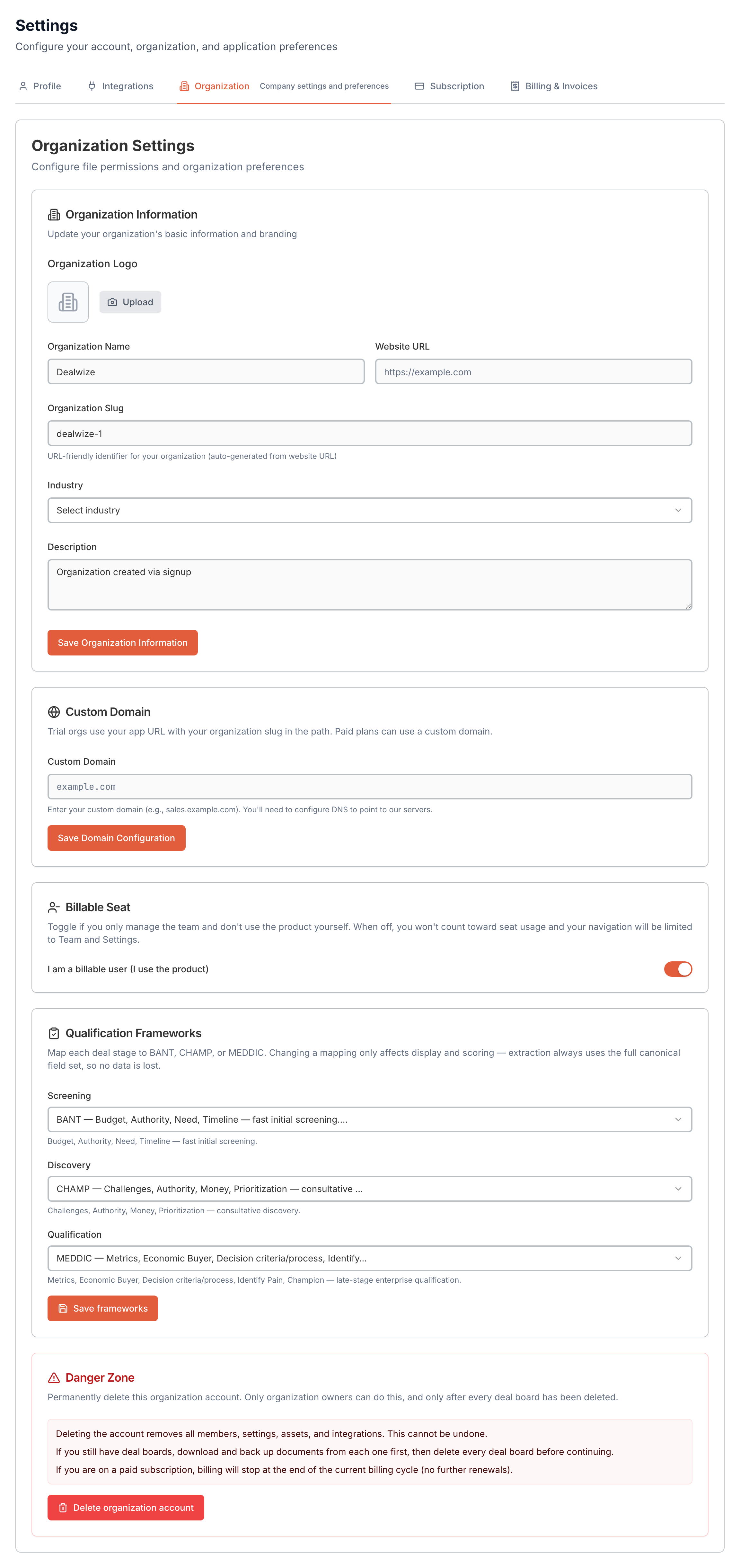
### Company Identity & URL Slug
* **Organization Name**: The formal name of your company displayed in navigation headers, email notifications, and customer invoices.
* **Organization Slug (`organization.slug`)**: The URL-safe path prefix for your workspace (e.g. `revtelic.comm/acme-corp/`). Revtelic automatically suggests slugs based on your company website domain (`generateSlugFromUrl`), with live validation ensuring uniqueness.
* **Website URL & Industry**: Company metadata used by the Revtelic Brutal Truth engine to contextualize deal diagnostics and competitive risk benchmarks.
### Custom Branding & Logo Upload
Upload your official company emblem (SVG, PNG, JPG):
* **Placement**: Renders on the internal Deal Board navigation bar, client-facing Stakeholder Preview microsites, shared Mutual Action Plans, and PDF collateral previews.
* **Asset Security**: Stored in isolated enterprise buckets and served via signed URLs with dynamic cache invalidation (`useOrganizationLogoUrl.ts`).
### Custom Domains & White-Labeling
To present Deal Boards under your corporate brand identity instead of the default `revtelic.comm` domain:
1. Enter your desired custom subdomain in the **Custom Domain** field (e.g. `deals.yourcompany.com`).
2. Point a **CNAME** DNS record at your domain registrar to `cname.revtelic.comm`.
3. Click **Verify DNS**. Revtelic provisions an automated SSL/TLS certificate and activates custom domain routing across all shared Deal Boards.
### Qualification Framework Defaults
Through the embedded **Qualification Frameworks Card** (`QualificationFrameworksCard.tsx`), administrators configure which sales methodology lenses are active across the pipeline:
* **MEDDIC / MEDDPICC**: Default for enterprise and multi-stakeholder evaluations.
* **CHAMP**: Tailored for mid-market technical evaluations focused on Challenges and Authority.
* **BANT**: Streamlined for rapid early-stage qualification.
Toggling framework visibility controls the stage projection tabs reps see on their dealboards while preserving the unified 10-key canonical data model (`qualification-meddic-bant-champ.md`).
### Danger Zone: Cascade Deletion
Administrators can initiate organization deletion through the **Delete Organization Modal** (`DeleteOrganizationModal.tsx`). Before confirmation, Revtelic displays an impact summary detailing the exact count of affected Deal Boards, customer contacts, transcripts, team accounts, and active subscriptions.
---
## 4. Subscription & Billing
Revtelic separates commercial plan capacity from payment execution across two dedicated views: the **Subscription** tier selector (`SubscriptionTab.tsx`) and the **Billing & Invoices** portal (`BillingTab.tsx`).
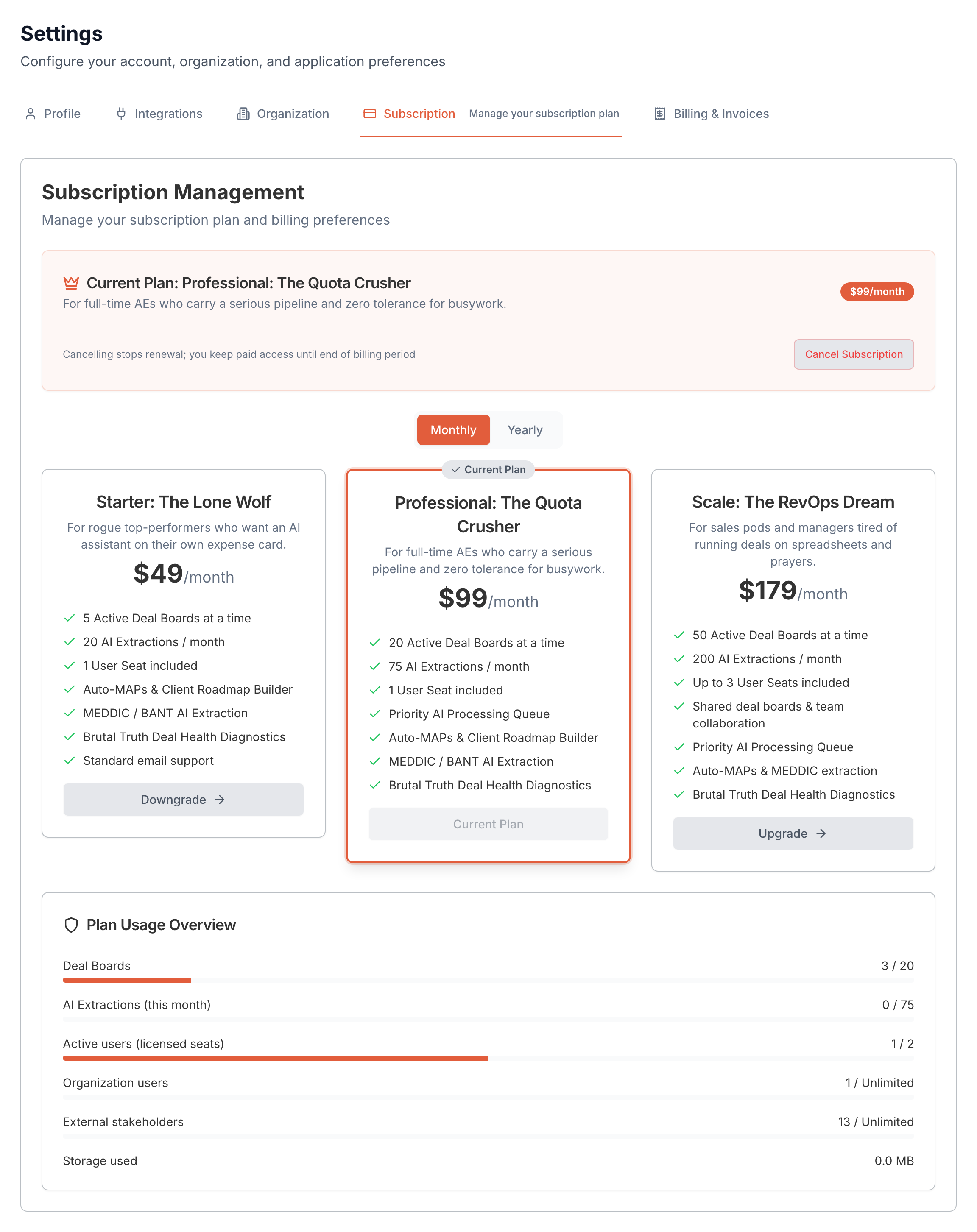
### Subscription Plans & Operational Limits
Administrators can review current plan allocations and upgrade or downgrade tiers:
| Operational Metric | Starter Plan | Growth Plan | Enterprise Tier |
| :--- | :--- | :--- | :--- |
| **Licensed Seats** | Up to 5 Seats | Up to 25 Seats | Custom / Unlimited |
| **Deal Boards (Microsites)** | 10 per seat | 25 per seat | Unlimited |
| **Storage per Deal Board** | 2 GB / board | 10 GB / board | Custom dedicated storage |
| **Monthly AI Extractions** | 50 / month | 250 / month | Unlimited enterprise quota |
| **Daily AI Invocations** | 10 / board / day | 50 / board / day | High-throughput dedicated pool |
| **Billing Intervals** | Monthly / Annual | Monthly / Annual (20% Savings) | Annual Custom Contract |
### Stripe Customer Billing Portal
Revtelic integrates directly with Stripe (`StripeService.ts`) for secure, self-service payment management:
* **Payment Methods**: Add, update, or remove credit cards (Visa, Mastercard, AMEX). Set a primary default card for automatic renewals.
* **Billing Address & VAT**: Maintain company legal name, tax ID (EU VAT, GST), billing contact email, and corporate billing address.
* **Plan Upgrades / Seat Additions**: Seamlessly add billable rep seats with proration handled automatically by Stripe.
### Invoices & Receipts
The **Billing & Invoices** tab maintains a complete audit trail of historical transactions:
* **Invoice Table**: Lists invoice date, reference ID, billed amount, and payment status (`paid`, `pending`, `failed`).
* **PDF Downloads**: Click **Download Invoice** on any line item to retrieve compliant tax invoice PDFs for accounting and finance teams.
* **Automated Receipts**: Billing receipts are automatically dispatched to designated accounting email addresses upon successful renewal.
---
## Summary Table: Settings Capabilities by Role
| Capability | Module / Component | Member | Admin / Owner |
| :--- | :--- | :---: | :---: |
| Update Name, Email & Avatar | `ProfileTab.tsx` | | |
| Rotate Password & Security | `ProfileTab.tsx` | | |
| Generate / Revoke MCP API Keys | `IntegrationsTab.tsx` | | |
| Connect Cursor / Claude / ChatGPT | `IntegrationsTab.tsx` | | |
| Edit Company Name, Slug & Website | `OrganizationTab.tsx` | ❌ | |
| Upload Corporate Logo Branding | `OrganizationTab.tsx` | ❌ | |
| Configure CNAME Custom Domain | `OrganizationTab.tsx` | ❌ | |
| Set Workspace Qualification Frameworks | `OrganizationTab.tsx` | ❌ | |
| Change Subscription Plan & Seat Licenses | `SubscriptionTab.tsx` | ❌ | |
| Manage Payment Cards & Download Invoices | `BillingTab.tsx` | ❌ | |
| Cascade Delete Organization | `OrganizationTab.tsx` | ❌ | |
---
## Related Documentation
* Invite and manage team colleagues: [Team Access, Internal Roles & Workspace Governance](/docs/getting-started/team-access-and-roles)
* Connect external LLM workflows: [Model Context Protocol (MCP) Guide](/docs/llm-and-ai-integrations/model-context-protocol-mcp)
* Configure client permissions: [External Stakeholder Access & Permissions](/docs/deal-boards/stakeholder-access-and-permissions)
* Setup sales methodologies: [Automated Deal Qualification: MEDDIC, BANT & CHAMP](/docs/deals/qualification-meddic-bant-champ)
---
## [Doc] Connecting Revtelic to Web-Based AI Accounts (Claude Web, ChatGPT & IDEs)
URL: https://revtelic.com/docs/llm-and-ai-integrations/connecting-with-claude-desktop
# Connecting Revtelic to Web-Based AI Accounts
You do not need to install local CLI tools, edit local JSON files, or run Node.js processes on your laptop to inspect your pipeline with AI.
Revtelic connects directly to your **web-based AI accounts**—including **Claude Web** (via Custom Connectors), **ChatGPT**, **Cursor**, and **Claude Desktop**—over a managed cloud Model Context Protocol (MCP) server with one-click in-browser authentication.
---
## 1. Connecting Claude Web / Team Connectors
Claude now natively supports remote MCP servers in the browser. You can link your Revtelic workspace to your Claude account in under 60 seconds:
1. Open **Claude** in your browser ([claude.ai](https://claude.ai)).
2. Navigate to **Settings > Connectors** (or **Team Settings > Integrations** for team accounts).
3. Click **Add Custom Connector**.
4. Configure the connector settings:
* **Server Name**: `Revtelic`
* **Server URL**: `https://api.revtelic.com/api/v1/mcp`
* **Authentication**: `OAuth 2.0 (Automatic Discovery)`
* **Discovery URL**: `https://api.revtelic.com/.well-known/oauth-authorization-server`
5. Click **Connect**. Claude will query Revtelic's OAuth discovery endpoint.
6. A secure popup opens prompting you to sign in with your corporate Google SSO or work email. Confirm access to grant Claude access to your deals.
> [!TIP]
> **Persistent Cloud Connection:** Because this is a remote cloud integration, your Revtelic connector follows your Claude account across any laptop, mobile browser, or tablet without needing local configuration.
---
## 2. Connecting ChatGPT (Custom GPTs & Actions)
Revtelic supports ChatGPT Mixed Authentication, allowing both unauthenticated guest transcript analysis and secure OAuth workspace queries:
1. In ChatGPT, create or edit your **Custom GPT** (or open **Workspace Integrations**).
2. Under **Actions**, select **Add Action** or **Import from URL**.
3. Set the Schema Import URL to:
```text
https://api.revtelic.com/api/v1/mcp
```
4. Set **Authentication** to **OAuth**:
* **Client ID & Secret**: Obtained from your Revtelic account under **Settings > Integrations > API & MCP**.
* **Authorization URL**: `https://app.revtelic.com/auth/oauth/authorize`
* **Token URL**: `https://api.revtelic.com/api/v1/auth/oauth/token`
5. Save the configuration. Users in your ChatGPT workspace can now run `analyze_deal` as guests, or click **Sign In** to view their private dealboards.
---
## 3. Connecting Cursor & Windsurf IDEs
For developers, sales engineers, or technical founders building sales agents in IDE copilots:
1. Open **Cursor Settings > Features > MCP** (or edit `~/.cursor/mcp.json` / workspace `.cursor/mcp.json`).
2. Add the Revtelic remote server definition using your live integration key:
```json
{
"mcpServers": {
"revtelic": {
"url": "https://api.revtelic.com/api/v1/mcp",
"headers": {
"Authorization": "Bearer dw_live_YOUR_API_KEY"
}
}
}
}
```
*(Retrieve your API key from [app.revtelic.com](https://app.revtelic.com) under **Settings > Integrations > API & MCP**).*
---
## 4. Connecting Claude Desktop (Legacy SSE Transport)
If you use the native Claude Desktop application, configure it using Revtelic's Server-Sent Events (SSE) remote transport:
1. Open your Claude Desktop configuration file:
* **macOS**: `~/Library/Application Support/Claude/claude_desktop_config.json`
* **Windows**: `%APPDATA%\Claude\claude_desktop_config.json`
2. Add the Revtelic SSE remote server entry:
```json
{
"mcpServers": {
"revtelic": {
"url": "https://api.revtelic.com/api/v1/mcp/sse",
"headers": {
"Authorization": "Bearer dw_live_YOUR_API_KEY"
}
}
}
}
```
3. Restart Claude Desktop. The Revtelic tool hammer icon will appear in your chat composer.
---
## 5. High-Leverage Inspection Prompts
Once connected, your AI assistant operates with live pipeline context. Here are 5 practical prompts to run in your daily sales workflow:
### 1. Forecast Reality Audit
> *"Inspect my active deals for this quarter using `get_deals`. Flag any opportunity currently in Commit stage where the Economic Buyer has not yet attended a meeting or confirmed the commercial terms."*
### 2. Slipped Milestone Follow-up
> *"Check the living Mutual Action Plan for the Meridian Health deal. What milestones were due this week, and what specific action should I take next to prevent the target go-live date from slipping?"*
### 3. Pre-Call Briefing from Raw Transcripts
> *"I have a follow-up call with Acme Corp in 20 minutes. Call `get_deal` and summarize the top 3 explicit risks flagged by Risk Sentinel and the primary champion gaps."*
### 4. Zero-Friction Deal Analysis (Guest Mode)
> *"Here is the transcript from today's demo call [paste text]. Call `analyze_deal` and give me an unvarnished Deal Health score, the Brutal Truth, and a drafted Mutual Action Plan."*
### 5. Multi-Threading Strategy
> *"Look up our opportunity with TechFlow. Who are the currently identified stakeholders, and what critical buying committee roles (e.g. Infosec, Procurement, Finance) are currently missing from the conversation?"*
---
## Related Guides & Deep Dives
* [Remote MCP Architecture & Endpoint Reference](/docs/llm-and-ai-integrations/model-context-protocol-mcp)
* [Understanding Deal Health & Scoring Mechanics](/docs/deals/understanding-deal-health)
* [Managing and Resolving Deal Risks: The Deal Risk Matrix](/docs/deals/risk-detection-and-matrix)
* [Creating & Sharing Collaborative Mutual Action Plans](/docs/mutual-action-plans/creating-and-sharing-maps)
---
## [Doc] Connecting Revtelic via Remote Model Context Protocol (MCP)
URL: https://revtelic.com/docs/llm-and-ai-integrations/model-context-protocol-mcp
# Connecting Revtelic via Remote Model Context Protocol (MCP)
Stop copying and pasting sensitive CRM notes, customer transcripts, and competitor intel into generic ChatGPT prompts.
Revtelic provides a native, cloud-hosted **Remote Model Context Protocol (MCP)** server. Instead of forcing you to install Node.js, manage local JSON config files, or keep terminal processes running in the background on your machine, Revtelic connects directly to your **web-based AI accounts**—including **Claude Web / Custom Connectors**, **ChatGPT**, and IDEs like **Cursor** and **Windsurf**—over secure HTTPS and Server-Sent Events (SSE).
---
## Why Remote MCP?
Traditional local MCP servers require running an `npx` package or Python script on your personal computer, locking your AI assistant to a single desktop installation.
Revtelic runs a **fully managed remote cloud MCP infrastructure**:
* **Zero Local Dependencies**: No Node.js, no Docker containers, and no background terminal processes.
* **Web-First AI Integration**: Connect directly from Claude Web, ChatGPT, or browser-based AI copilots.
* **In-Chat OAuth 2.0**: Authenticate your Revtelic workspace directly inside your AI chat using standard web browser single sign-on (SSO).
* **Live Deal Reality**: Your AI model queries real, active deal state—Deal Health scores (0–100), The Brutal Truth, stakeholder maps, and living Mutual Action Plans—grounding advice in empirical deal evidence rather than rep optimism.
```
┌─────────────────────────────────────────────────────────────┐
│ AI Clients │
│ Claude Web • ChatGPT • Cursor • Custom AI Agents │
└──────────────────────────────┬──────────────────────────────┘
│
HTTPS / SSE / OAuth 2.0 (RFC 8414)
│
▼
┌─────────────────────────────────────────────────────────────┐
│ Revtelic Remote MCP Server │
│ https://api.revtelic.com/api/v1/mcp │
├─────────────────────────────────────────────────────────────┤
│ • Stateless Streamable HTTP & SSE Transport │
│ • Mixed Authentication (Guest Diagnostic vs. OAuth 2.0) │
│ • Automatic UUID <-> Human Slug Resolution │
└──────────────────────────────┬──────────────────────────────┘
│
▼
┌─────────────────────────────────────────────────────────────┐
│ Revtelic Multi-Agent Intelligence │
│ Value Architect • Milestone Miner • Risk Sentinel │
└─────────────────────────────────────────────────────────────┘
```
---
## 1. Remote Server Endpoints
Connect your AI client using Revtelic's official production endpoints:
| Transport Protocol | Endpoint URL | Supported Clients |
| :--- | :--- | :--- |
| **Streamable HTTP (Recommended)** | `https://api.revtelic.com/api/v1/mcp` | Claude Web (Custom Connectors), Cursor, Windsurf, Custom Agent Pipelines |
| **Server-Sent Events (SSE)** | `https://api.revtelic.com/api/v1/mcp/sse` | Claude Desktop, Legacy SSE clients |
| **OAuth 2.0 Discovery** | `https://api.revtelic.com/.well-known/oauth-authorization-server` | Automatic RFC 8414 in-chat authentication |
---
## 2. Authentication: Mixed Auth Architecture
Revtelic implements a **mixed authentication model** designed for maximum flexibility:
### 1. Guest Diagnostic Mode (No Authentication Required)
The `analyze_deal` tool can be executed completely unauthenticated. You can paste any raw call transcript, discovery recording, or email thread into your AI assistant, and Revtelic will immediately generate a comprehensive Deal Health assessment and Mutual Action Plan without requiring you to log in or create an account.
### 2. Workspace Mode (OAuth 2.0 or API Key)
When querying or updating saved deals inside your private workspace (e.g. `get_deals`, `get_deal_health`, `update_deal`), authentication is enforced via:
* **In-Chat OAuth 2.0 (Recommended for Web Clients)**:
1. Add `https://api.revtelic.com/api/v1/mcp` to your AI client.
2. The client discovers Revtelic's OAuth endpoints via `/.well-known/oauth-authorization-server`.
3. The first time you ask a question about your saved deals, a secure browser popup opens.
4. Log in using Google SSO or your work email to link your chat session.
* **Integration API Key (`dw_live_...`)**:
1. For IDEs (Cursor, Windsurf) or automated backend scripts, log in to [app.revtelic.com](https://app.revtelic.com).
2. Navigate to **Settings > Integrations > API & MCP**.
3. Copy your live API key (`dw_live_...`) and pass it as an HTTP header: `Authorization: Bearer dw_live_YOUR_KEY`.
---
## 3. Canonical Remote MCP Tools
Revtelic exposes 12 specialized tools directly to your LLM, mirroring our multi-agent deal execution engine:
| Tool Name | Auth Mode | What It Does |
| :--- | :--- | :--- |
| `analyze_deal` | **None** (Guest Supported) | Analyzes a raw call transcript, email thread, or meeting notes. Returns Deal Health score (0–100), Brutal Truth, top risks, stakeholder map, next best action, and a shareable deal link. |
| `get_deal_health` | OAuth / API Key | Returns the objective 0–100 Deal Health score, uncertainty reduction metrics, and the underlying evidentiary score drivers for a specific opportunity. |
| `get_deal_risks` | OAuth / API Key | Identifies explicit and hidden deal blockers across commercial, stakeholder, timing, procurement, technical, and competitive categories. |
| `get_stakeholders` | OAuth / API Key | Evaluates champion strength, economic buyer access, decision-maker alignment, and identifies missing key stakeholders. |
| `get_next_best_action` | OAuth / API Key | Recommends the single highest-priority seller action to progress or unblock the deal, complete with designated owner and target due date. |
| `get_deal` | OAuth / API Key | Retrieves the complete deal intelligence dossier: North Star goals, Brutal Truth, risk analysis, qualification gaps, and MAP summary. |
| `get_deals` / `list_deals` | OAuth / API Key | Paginated listing of your active Deal Boards, with current health scores, buyer commitment ratings, and primary risks. |
| `generate_mutual_action_plan` | OAuth / API Key | Extracts and builds a structured, backward-scheduled Mutual Action Plan with sequential phases, action items, assignees, and target go-live dates. |
| `get_mutual_action_plan` | OAuth / API Key | Retrieves the current living MAP for an opportunity, including phase progress, completed milestones, and outstanding buyer/seller tasks. |
| `update_deal` | OAuth / API Key | Ingests new call transcripts or updates deal status, automatically triggering delta analysis to update health, risks, and MAP progress without wiping existing tasks. |
| `share_deal` | OAuth / API Key | Generates safe, privacy-controlled shareable links for client-facing dealboards or internal deal diagnosis one-pagers. |
| `connect_account` / `get_login_url` | **None** (Guest Supported) | Generates a secure OAuth authorization link to connect your AI client to your Revtelic account. |
---
## 4. Human-Readable Identifier Resolution
LLMs and sales reps rarely think in 36-character UUIDs like `f47ac10b-58cc-4372-a567-0e02b2c3d479`.
The Revtelic Remote MCP server includes an automatic **Slug <-> UUID Resolution Engine**:
* When an AI client passes a human-readable slug (e.g. `deal_id: "acme-hybrid-cloud"` or `"meridian-hospitality"`), Revtelic automatically resolves it to the correct internal database record.
* When returning data back to the AI client, internal database UUIDs are automatically replaced with clean, human-readable organization and dealboard slugs (`org_slug/deal_slug`), keeping conversations intuitive and error-free.
---
## 5. Example Prompts to Run in Your AI Chat
Once connected, your AI assistant operates as a dedicated deal execution partner:
* *"Run `get_deals` and tell me which 3 opportunities in my pipeline have the lowest Deal Health scores and why."*
* *"Here is the transcript from today's security architecture sync with Globex. Call `analyze_deal` and flag any hidden objections raised by their Infosec lead."*
* *"Look up the Apex Systems opportunity. What is our single next best action, and when is it due?"*
* *"Check the living Mutual Action Plan for Meridian Health. Has their procurement team completed the vendor onboarding questionnaire scheduled for this week?"*
* *"Update the Acme Corp deal with these meeting notes and refresh our Deal Health score."*
---
## Related Setup Guides
* [Connecting Revtelic to Web-Based AI Accounts (Claude Web, ChatGPT & Cursor)](/docs/llm-and-ai-integrations/connecting-with-claude-desktop)
* [Understanding Deal Health Scoring Mechanics](/docs/deals/understanding-deal-health)
* [Creating & Sharing Collaborative Mutual Action Plans](/docs/mutual-action-plans/creating-and-sharing-maps)
* [Managing and Resolving Deal Risks: The Deal Risk Matrix](/docs/deals/risk-detection-and-matrix)
---
## [Doc] Creating & Sharing Collaborative Mutual Action Plans
URL: https://revtelic.com/docs/mutual-action-plans/creating-and-sharing-maps
# Creating & Sharing Collaborative Mutual Action Plans
Spreadsheets titled `Mutual_Plan_v3_REAL_FINAL.xlsx` get buried in email threads, go stale within days, and place 100% of the administrative burden on the sales rep.
Revtelic replaces static file attachments with living, bi-directional collaboration dealboards. In Revtelic, a Mutual Action Plan operates across **two distinct aspects**:
1. **The Deal Board MAP (Internal Management View)**: Where sellers configure, edit, and orchestrate milestones, link collateral, and monitor execution alongside deal health diagnostics.
2. **The Stakeholder View (Client-Facing Shared Dealboard & "Preview")**: The clean, branded portal shown when clicking **Preview** or when buyers open their shared link—enabling prospects to complete tasks, view linked assets, and track progress toward their target go-live date.
---
## 1. The Two Aspects of Revtelic MAPs
To protect sensitive deal strategy while giving buyers total transparency into project delivery, Revtelic cleanly separates the seller workspace from the client workspace:
```
┌─────────────────────────────────────────┐
│ Revtelic MAP Architecture │
└────────────────────┬────────────────────┘
│
┌─────────────────────────────────────┴─────────────────────────────────────┐
▼ ▼
┌───────────────────────────────────────────┐ ┌───────────────────────────────────────────┐
│ 1. The Deal Board MAP (Internal View) │ │ 2. The Stakeholder View ("Preview") │
│ /deal-boards/:id & /deal-health/:org/:slug│ │ /:orgSlug/:dealboardSlug (or Preview) │
├───────────────────────────────────────────┤ ├───────────────────────────────────────────┤
│ • Plan editing, phase management & tasks │ │ • Branded client portal (Classic/Gallery) │
│ • AE win forecast & internal quota targets│ │ • Dedicated "Action Plan" & "Content" tabs│
│ • Internal Deal Health & Risk Matrix link │ │ • Direct asset previews & deliverable DLs │
│ • Assign internal reps & client contacts │ │ • Interactive task & checklist check-offs │
│ • AI delta analysis from call transcripts │ │ • Sanitized: NO health scores or risks │
│ [Requires Authenticated Team Login] │ │ [Zero-Friction Link: No Password Needed] │
└───────────────────────────────────────────┘ └───────────────────────────────────────────┘
```
---
## 2. Aspect 1: The Deal Board MAP (Internal Management)
The Deal Board view (`/deal-boards/[id]` and the Deal Reality One-Pager `/deal-health/[orgSlug]/[boardSlug]`) is your internal command center for the opportunity.
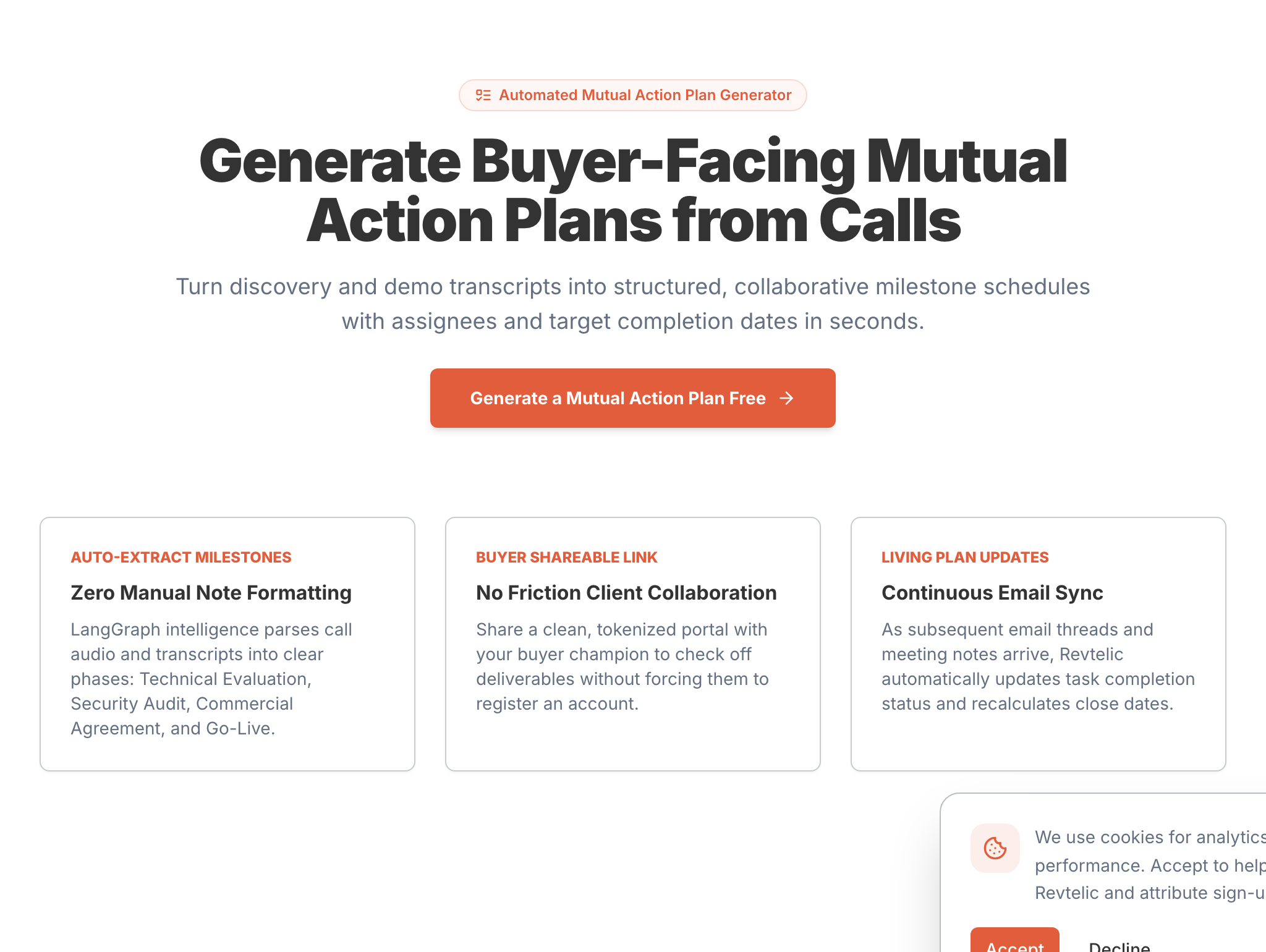
### Automated Extraction via Milestone Miner
Manual plan creation is time-consuming. Revtelic automates roadmap generation using the **Milestone Miner** agent—a core node in our LangGraph multi-agent pipeline.
When call transcripts, emails, or discovery notes are ingested, Milestone Miner categorizes commitments into four operational item types:
* **`task`**: Internal work items, preparation to-dos, and administrative follow-ups (e.g., *Configure tailored sandbox environment* or *Retrieve Jira/Atlassian integration docs*).
* **`action`**: Concrete execution steps and activities between teams (e.g., *Share instant misconfiguration alert feature details* or *Submit vendor security questionnaire*).
* **`meeting`**: Scheduled calendar events, alignment calls, and stakeholder workshops (e.g., *Technical architecture deep dive with Lead Architect*).
* **`asset_required`**: Tangible deliverables that gate evaluation progress (e.g., *SOC 2 Type II audit report*, *Customized ROI model*, or *Sample executive summary PDF*).
### Continuous Delta Analysis
As deals evolve over weeks or months, reps ingest subsequent call recordings or notes. Milestone Miner performs **delta analysis**—identifying completed commitments, updating deadlines, and inserting newly negotiated requirements without wiping manual edits or completed tasks.
### Live Momentum Counters
On the Deal Reality dashboard, reps get an immediate pulse check through live status counters:
* **Actions Complete**: Displays completed items versus total items (e.g., `0/12 actions complete`).
* **In Progress**: Highlights active items currently being worked on.
* **Critical**: Flags urgent items with imminent or overdue target dates.
* **Phases**: Number of structured chronological stages in the evaluation.
* **Target Completion Anchor**: Prominently displays the buyer's go-live milestone (e.g., `Target: Go live before 15-Oct-2026`).
---
## 3. Aspect 2: The Stakeholder View ("Preview" & Shared Dealboard)
Clicking the **"Preview"** button from your Deal Board management page opens the **Stakeholder View** (`app.revtelic.com//` or `/deal-boards/[id]/preview`).
This is the exact interactive experience your buyer sees when you share the link.
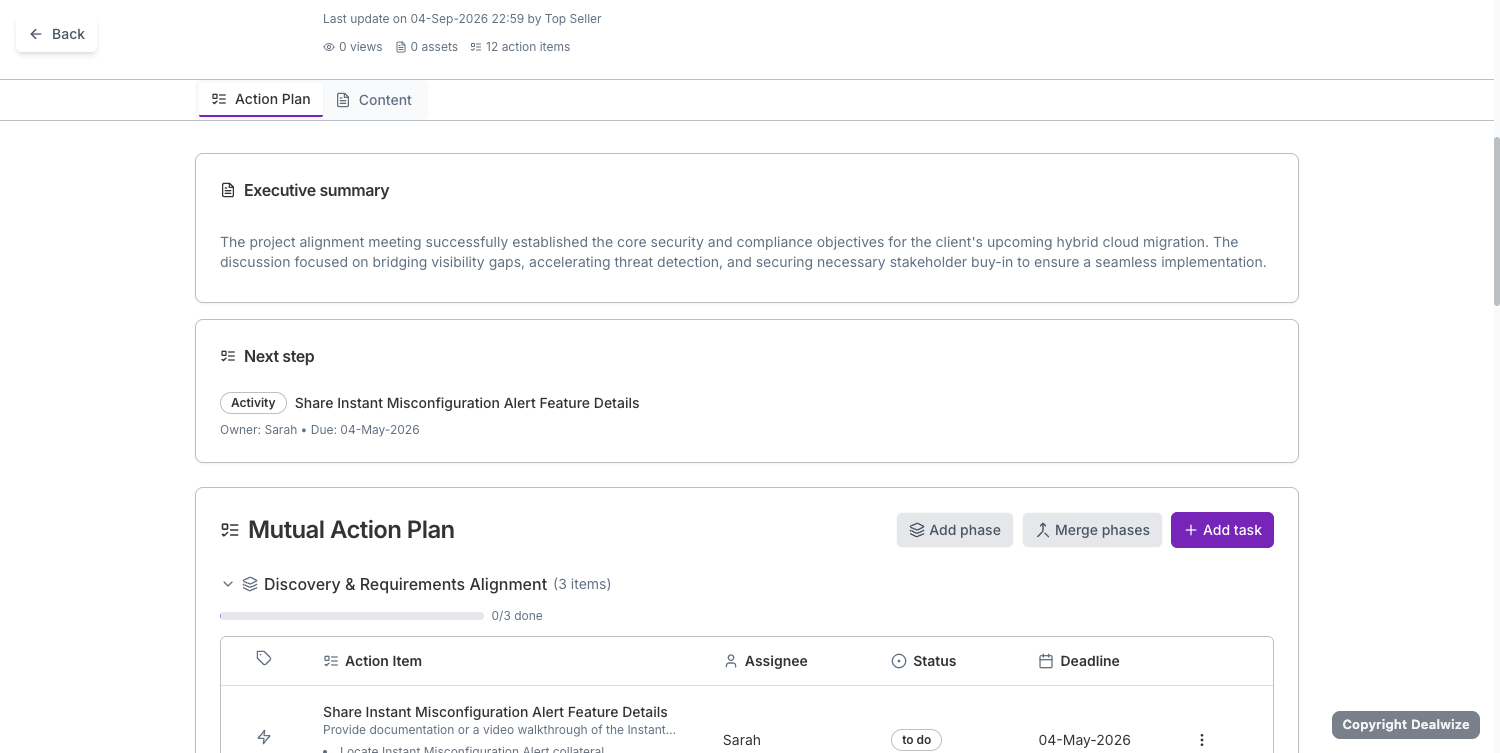
### What the Stakeholder View Includes:
1. **Header Metadata & Telemetry Strip**:
* Displays the last update timestamp and author (e.g. *Last update on 04-Sep-2026 by Top Seller*).
* Live engagement counters: total view count (`0 views`), attached content assets (`0 assets`), and total action plan items (`12 action items`).
2. **Dual-Tab Interface**:
* **Action Plan Tab**: The running operational agenda showing customer executive summaries, immediate next steps, and phased milestone backlogs.
* **Content Tab**: Centralized digital collateral room where proposals, security whitepapers, architecture diagrams, and pricing sheets are shared.
3. **Customer-Facing Executive Summary Card**:
* Synthesizes the core business, security, and technical objectives agreed during discovery (e.g., *bridging visibility gaps, accelerating threat detection, and securing hybrid cloud migration*).
4. **Next Step Highlight**:
* Eliminates the *"what happens next?"* friction by pinning the immediate priority action item (e.g., *Share Instant Misconfiguration Alert Feature Details*), with designated owner and due date.
5. **Interactive Mutual Action Plan Table & Controls**:
* Chronological evaluation phases with visual progress indicators (e.g., `Discovery & Requirements Alignment`, `0/3 done`).
* Action items featuring granular execution subtasks, assigned owners (`Sarah`), status tracking (`to do`, `in progress`, `complete`), and firm target deadlines.
* Plan controls for sales engineers and champions (`Add phase`, `Merge phases`, `+ Add task`).
6. **Interactive Checklists & Direct Asset Access**:
* Action items can include embedded micro-checklists (`checklist`) allowing stakeholders to tick off steps (e.g., *Review REST APIs*, *Confirm webhook endpoints*).
* Items with deliverables (e.g., *Review SOC 2 Type II Report*) link directly to the asset preview dialog (`onOpenAssetPreview`), letting evaluators inspect compliance collateral in-browser without downloading attachments.
7. **Two-Way Collaboration (`canContribute`)**:
* When granted collaboration access, client champions and technical evaluators can mark their own tasks as done, update checklist items, and log comments directly on the board.
8. **Strict Security & Privacy Isolation**:
The Stakeholder View automatically sanitizes internal deal intelligence:
* **Hidden**: Deal Health score (0–100), The Brutal Truth analysis, internal risk matrix, AE forecast percentages, and internal sales rep coaching notes are strictly suppressed (`hideNorthStarAndRisks = true`).
* **Visible**: Only mutual objectives, customer executive summaries (`client_executive_summary`), shared milestones, and agreed collateral are rendered.
9. **Zero-Friction Buyer Access**:
* Buyers do not need to register, remember a password, or download software. They access the shared dealboard via a secure, tokenized URL.
---
## 4. Tracking Buyer Reciprocity & Engagement Telemetry
A Mutual Action Plan is only effective if the buyer is actively participating. In Revtelic, every interaction in the Stakeholder View feeds directly into deal intelligence telemetry:
* **Board Visits & Tab Switches**: Detects when stakeholders open the dealboard and switch between the **Content** and **Action Plan** tabs (`preview_tab: 'action-plan'`).
* **Asset Telemetry**: Tracks when security whitepapers, contracts, or technical specs are viewed or downloaded.
* **Milestone Execution**: Monitors whether buyer assignees are checking off assigned items or missing agreed deadlines.
If an AE has completed multiple seller tasks while the buyer has not completed their tasks or visited the shared dealboard in 10 days, the **Risk Sentinel** automatically flags a lack of buyer reciprocity—alerting the rep and manager to deal stalling before the quarter ends.
---
## 5. End-to-End Workflow for Sales Reps
### Step 1: Ingest Call Transcripts to Generate the Plan
Upload discovery notes or call transcripts into Revtelic (via `/analyze` or your CRM integration). The **Milestone Miner** drafts the initial phased roadmap.
### Step 2: Configure & Refine in the Deal Board
Open the deal in your Deal Board. Verify that the anchor milestone reflects the buyer's compelling event (e.g., *Go-live before Q4 peak season*). Assign specific owners across both teams formatted as `Name (Organization)`.
### Step 3: Click "Preview" to Inspect the Stakeholder Experience
Before sharing with your prospect, click the **Preview** button in the top navigation. Verify that:
* The client executive summary is crisp and customer-centric.
* All required collateral (whitepapers, SOC 2 reports) are attached to relevant action items.
* Internal notes and risk scores are sanitized.
### Step 4: Share the Live Link
Open the **Share** dialog, copy the buyer-facing dealboard link (`app.revtelic.com//`), and send it to your champion in your follow-up email.
### Step 5: Run Evaluation Calls from the Living MAP
Rather than sending generic *"just checking in"* emails, use the shared Stakeholder View as the living agenda for every scheduled sync call.
---
## Related Guides & Deep Dives
* Configure buyer permissions: [External Stakeholder Access & Permissions](/docs/deal-boards/stakeholder-access-and-permissions)
* Track buyer engagement: [Buyer Engagement Telemetry & Behavioral Analytics](/docs/deal-boards/buyer-engagement-analytics)
* Understand risk detection: [Risk Detection & The Blocker Matrix](/docs/deals/risk-detection-and-matrix)
* Diagnose deal vitality: [Understanding Deal Health & Scoring Mechanics](/docs/deals/understanding-deal-health)